Showing posts with label Review-Product. Show all posts

Thursday, March 27, 2014

Review HP Z1 All-in-One Workstation

I had a chance to take a look at Hewlett Packard’s all-in-one workstation the HP Z1.  Here is what I found.

Overview

The HP Z1 was a great machine to use.  I loved that it was compact but yet big enough. It was easy to transport and it performed as well as any other workstation.  With all of its components being literally in your face I expected the noise to be a bother. I found that it wasn’t. The HP Z1 runs very quietly and noise was not an issue. It had plenty of ports and functioned just like any other workstation. Not having to bend under my desk to insert media was a nice little benefit that I wanted to make sure I mentioned. Opening the body of the machine was quite easy to do and all components are easily accessed. The lack of wires was also very nice.

Main Specs


  • 27” Monitor
  • Intel Xeon Processor
  • 16 GB DDR3-1600 ECC RAM
  • Nvidia Quadro 4000M GPU
  • 1 TB SATA Hard Drive
  • Windows 7 Pro Operating System
  • HP SATA Blu-Ray Writer Slot Load Optical Drive
  • 400W Power Supply
  • ISV Certification
  • Tool-less Design Chassis
  • Dual Display Capable


Wednesday, October 2, 2013

Review-HP EliteBook 8570w Mobile Workstation


I tested the HP EliteBook 8570w Workstation.  Here is my review.  It is broken down into two parts; Brief Overview and Full Review.  The brief review is short and covers the major points.  The Full review goes into far greater detail.  Sometimes you just want to know the basics and sometimes you need to know everything.

Brief Overview

Main Specs

The EliteBook 8570w that I tested was on the high end of HP’s spectrum.  Here is a list of the main specifications for the hardware:
  • CPU:  Intel® Core™ i7-3740QM (2.7 GHz, 6 MB cache, 4 cores)
  • Display: 15” LCD (15.6”) active color with built-in webcam (1920x1080)
  • Memory:  16 GB 1600 MHz DDR3 SDRAM
  • Graphics: Nvidia Quadro K2000M 2GB 
  • Storage: Seagate 750 GB 7200 rpm SATA
  • Multimedia Drive: DVD read/write & SD Card slot
  • Security: Fingerprint reader, Face recognition
  • Operating System: Windows 7 Pro 
  • Wireless/Communications: Wi-Fi, 56K v.92 Modem, Optional HSPA+ Broadband Radio

The Good

The HP EliteBook 8570w mobile workstation is just that.  It has the full power of a desktop workstation, good graphics, interesting security options (fingerprint scanner), plenty of ports (USB, VGA, Display Port, Esata), the keyboard was easy to use, good looking screen, possible broadband data connection (built in), wi-fi, DVD player/recorder, and a backlit keyboard.  This mobile workstation has everything.  It is very expandable (up to 32 GB RAM on quad core i7), has a PCI slot, SD Card slot, and a great industrial design look.  It is very sturdy and rugged feeling.  A bonus is that the keyboard is full size and has a full numeric keypad.  Most laptops lack this feature.

Tuesday, October 23, 2012

Review-HP Designjet T2300 eMFP


Brief Overview


The HP Designjet T2300 eMFP is a large format, inkjet color printer, scanner, and copier with web connectivity that allows users to print to it remotely on either their computer or via a mobile device (such as a tablet or smartphone.)  It has two media rolls for continuous printing.  A color touch screen panel controls all the aspects of the device and a USB port next to the control panel where users can print directly from the USB drive.  HP sent me a review unit (and this thing is a huge beast of a printer by the way) to test.  Here I am sharing with you what I found.  What I liked and what I didn't care for.  In short, I really like this printer and I recommend it.

Friday, July 20, 2012

Hands On Review - HP z420 Workstation


Brief Overview

I had a chance to review one of HP’s Z series workstations, the HP z420 Workstation.  The z420 Workstation is a mid-range workstation.  It is a balance between price and performance and at the time of this writing is HP’s best-selling Workstation (per my interview with HP.)  Here is a brief review going over the basics and hitting on what I felt were the most important points.  If you want more detail and a look at my review process keep reading.

Main Specs
The HP z420 Workstation can come in a variety of hardware specifications.  We will discuss those later.  The unit I reviewed had the following major specs:

Saturday, March 10, 2012

3DConnexion’s SpacePilot™ Pro


3Dconnexion has been providing 3D mice for a long time now and I had the privilege of taking a look at their SpacePilot™ Pro.  A 3D mouse is an additional mouse that provides three dimensional interaction while working in CAD.  They allow easy access to different views through additional navigational tools.  Depending on the models features they can rotate your views, zoom in or out, pan, switch to saved views with the push of a button and provide a greater range of navigational tools than a standard mouse.  They do not replace a standard mouse but work with one.

3DConnexion’s SpacePilot™ Pro is their top of the line fully featured 3D mouse.  This product has all of the bells and whistles.  The SpacePilot™ Pro features six-degrees-of-freedom (6DoF) sensor technology, second generation Quickview Navigation Keys (providing 32 standard views), an LCD screen, multiple function keys, keyboard modifiers, and an ergonomic wrist rest design platform.

Wednesday, October 26, 2011

Mobi Systems Office Suite Pro 5 FREE on Amazon App Store - Today

The Amazon App Store has a free Android based App every day.  Today's app is Office Suite Pro 5 from Mobi Systems.  I already have an Office Suite for my Android hardware but I downloaded it anyway.  Why you ask?  Because (according to Mrs. CAD-a-Blog) I am an "App Hoarder"  She's not wrong.  I love me some apps, especially when they are free!  Amazon's Free App a day program is typically made up of stupid little games running anywhere from $0.99 and up.  Typically not a huge savings and typically apps I would never get, even when free.  But once every two to three weeks it seems Amazon throws in a golden nugget that keeps me coming back every day to see what's available.  I have gleaned some good stuff; CAM Scanner, Cut the Rope, Swift Key, Paper Camera, Printer Share Mobile (I can print from my phone/tablet), Thumb Keyboard, Wifi File Explorer and more.
The Amazon Android App Store is significant for two reasons: the free app a day program and the Kindle Fire (Coming November 15th.)  If you already have an Android device then getting free apps is a good thing.  If you plan on getting the Amazon Kindle then the only access you have to Android Apps will be through the Amazon App Store.  So if it's not there then your Kindle can't get it.  That's why I got this app today.  I didn't need it but there is a chance that I will be getting a Kindle Fire.  If so then I will want an office suite on it.  Now I don't have to buy one because the Amazon App Store knows which apps you purchased and you can reload them on all of your android devices, up to 5 I believe.  I just saved $15, if I get a Kindle Fire that is.  Yes I am an app hoarder.  If you don't like it then cast me in a reality show.

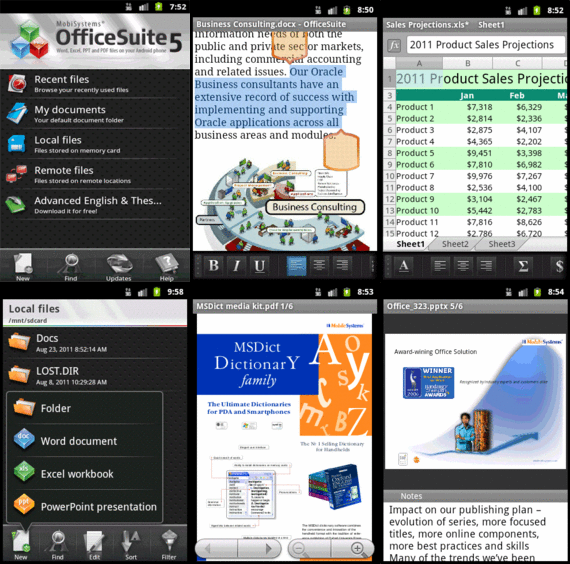
Office Suite Pro 5 is a pretty good mobile office suite.  It can open and edit Word, Excel, and Power Point files.  It can also open (not edit) PDF files.  But then most mobile office suites these days can.  It can handle these file types:
  • Text formats - Microsoft Office 97 to 2010 text documents - DOC and DOCX, RTF, TXT, LOG
  • Spreadsheets -Microsoft Office 97 to 2010 spreadsheets -XLS, XLSX andCSV
  • Presentations - Microsoft Office 97 to 2010 presentations -PPT, PPTX, PPSand PPSX
  • Other formats -PDF, EML, ZIP
Not bad, especially the ZIP format.  The App really shines when run on Honeycomb where it has a multi-pane view ability.  Another nice feature is the dictionary integration in the word processor.  Select a word and pick the Look Up option in the menu.  You have to have one of Mobi Systems Dictionary apps loaded to use this feature of course but maybe one day Amazon will give one of those away for free too!
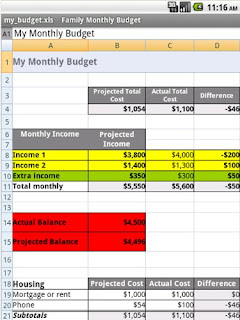
One thing that I don't like about Office Suite Pro 5 is that it can only open/save files on the device or to your Google Docs account.  It can not integrate with other cloud based applications like MobileMe, Dropbox, Sugar Sync, Box, etc.  If you use Google Docs and the others then it's fine.  Or you can download your file from Dropbox to your device then open it through Office Suite Pro 5.  I use Dropbox a lot so for me it's an issue.  But I got the app for free!

Overall Mobi Systems Office Suite Pro 5 is a good mobile Office viewing/editing application.  It's worth the regular price of $15 in the Amazon App store but it's a steal for free.  Get it.  Right now. Before it's too late!

Sunday, April 3, 2011

3Dconnexion releases drivers for 3D Mice for any application


3Dconnexion has just released a new driver for its line of 3D Mice. According to their press release and website, this new driver will let users use their 3D Mouse ( SpaceNavigator, SpaceNavigator for Notebooks, SpaceExplorer USB and SpacePilot PRO) with any application they are running! That's an interesting concept.

I downloaded the driver (108 mb) for Windows 64 bit and installed it on my Windows 7 laptop.  That was easy and painless.  I plugged my Navigator and later my Space Pilot PRO into my laptop and started opening programs.  The left button could not be altered, but I can change the function of the right.  Out of the box it acts like a left-click of the mouse (a regular mouse.)  The Space Pilot Pro already had so much integration with it (RSS feeds on the display, Outlook Integration, etc) that at first it didn't seem like much, but it's there.

In Chrome (and other browsers) I could scroll up and down web pages.  It gave the scroll wheel on my non-3D mouse a break.  In Adobe PDF Reader I could zoom in and out of my document and scroll through pages.  The same thing with Microsoft Word 2010.

So what does this mean?  For most people not much.  But for users it means that these 3D mice will (should) work out of the box with all applications.  No need to wait for the driver.  However, being able to use these 3D mice with "everything" is not that big of a deal.  It's not because it doesn't add much more functionality to the programs.  But if you already have one then use it.  If you were concerned about getting one (face it they aren't cheap) because you weren't sure if they would work with your program or maybe you wanted more bang for your buck, then now, maybe you don't have to worry about it.

There are drivers for Mac OS, 32 bit Windows, 63 bit Windows, Siemens (3DxMagellanProxy), and a few others.  I didn't see any Linux support.  These drivers are still in Beta and are not officially supported.  If you have any issues with them, well, use them at your own risk, they are beta.

Thursday, March 24, 2011

Product Review-the Pogo Plug

The Pogo Plug

The Pogo Plug is a very simple device that is easy to use and inexpensive to run.  It is a device and a service all in one that helps you create a personal cloud.  “Cloud” is a common buzz word these days in technology.  Put simply, “the cloud” is online storage.  Instead of keeping your files on your computer (desktop, laptop, netbook, tablet, mobile device) they are kept in “the cloud.”  This gives you access to your files on any device from anywhere.  The Pogo Plug from Cloud Engines (based in San Francisco, California, U.S.A.) provides this for you.  There are several models each of which provides the same basic cloud service.  Purchase the Pogo Plug model that suits your needs, set it up and start computing in the cloud.  No monthly fees, no service charges, nothing except for the one time purchase of the device.  This was one of the biggest selling points for me.  Yes I have a Pogo Plug and I love it.  It isn’t perfect of course, nothing is, but it does what I need it to and more.

Services

The Pogo Plug provides three main services:  remote access to files, file sharing, and live streaming.  There are a few more services but these are the three main reasons to get a Pogo Plug.

Once set up, the Pogo Plug gives you access to your files through an internet connection.  The Pogo Plug needs to be hooked in to your internet access from home (or small business, church, little league, etc.)  Once installed users can gain access either through an internet browser or through one of Pogo plug’s free downloadable applications.  There are two types of applications; for the desktop and for a mobile device.  You name the operating system and they have an application that applies.  It can be installed on Windows (XP, Vista, and 7 in either 32 or 63 bit), Linux and MAC OS.  They also have it available on mobile devices for iOS, Android, Blackberry, Windows Mobile and WebOS.  Like I said, you name it they make it.  The people at Pogo Plug want you to be able to access your files.

Categories

AutoDesk (110) autocad (109) AutoCAD 2009 (40) augi (40) efficient (38) news (37) drafting (33) training (33) articles (30) CADaBlog (29) AutoCAD WS (23) Update (23) quick tip (22) video (21) mobile (19) review (19) cad (16) 3D Mouse (15) 3Dconnexion (15) Impression (15) Android (14) AutoCAD 2013 (14) cadalyst (14) me (14) AutoCAD 2010 (13) text (13) off topic (12) survey (12) Apps (11) hotfix (11) tips (11) 3D (10) AU (10) AutoCAD 2011 (10) service pack (10) workstation (10) Autodesk Labs (9) CAD Manager (9) annotation (9) blocks (9) cloud (9) fun (9) inventor (9) HP (8) Review-Product (8) autocad lt (8) videos (8) AutoCAD 2014 (7) Autodesk 360 (7) CUI (7) Windows 8 (7) iOS (7) new (7) IMSI Design (6) cad standards (6) files (6) google (6) infinite skills (6) printers (6) reference (6) ribbon (6) support (6) updates (6) workaround (6) RSS (5) TurboViewer (5) Upgrade (5) data (5) email (5) fields (5) guest post (5) keyboard (5) layers (5) paper space (5) pi (5) pi day (5) quotes (5) rant (5) selection (5) standards (5) styles (5) subscription (5) tech (5) 2D (4) AutoCAD Exchange (4) AutoCAD for Mac (4) Mac (4) Mastering AutoCAD (4) SketchBook (4) TurboCAD (4) UI (4) action recorder (4) dimension (4) driver (4) fills (4) large format printing (4) leaders (4) math (4) mobile workstation (4) salary (4) sheet sets (4) Amazon (3) Apple (3) AutoCAD 2012 (3) AutoCAD 2015 (3) AutoCAD 360 (3) AutoCAD Fundamentals (3) Civil 3D (3) DVD (3) DWF (3) Fusion (3) GIS (3) Kindle Fire (3) Lenovo (3) Microsoft (3) Review-Software (3) Wiley (3) Windows Phone 8 (3) Windows RT (3) annimation (3) announcements (3) autodesk plm (3) book (3) command alias (3) contest (3) filters (3) find (3) hardware (3) history (3) iPad (3) license (3) license software (3) lisp (3) menu browser (3) properties (3) purge (3) quick view (3) saas (3) tables (3) toolbars (3) weekend rant (3) what not to CAD (3) what not to do (3) #CADaBlogDVD2013 (2) 3D Modeling (2) 3ds Max (2) AutoCAD LT 2013 (2) AutoCAD LT for Mac (2) AutoCAD MAC (2) Autodesk. (2) BIM (2) CAD Services (2) CADSpeed (2) DWG (2) DXF (2) Designjet (2) Error (2) FAIL (2) Facecast (2) Freestyle (2) Fusion for Mac (2) George Omura (2) Mac OS (2) Mountain Lion (2) Novedge (2) Recomend (2) Review-Book (2) Revit LT (2) SpaceMouse Pro (2) Sybex (2) Tablet (2) Thinkstation (2) TurboReview (2) TurboViewer X (2) What Not To Do In AutoCAD (2) What's New (2) Windows (2) array (2) as-builts (2) beta (2) blog (2) circles (2) civil (2) civil design (2) collaboration (2) color (2) command line (2) commands (2) computer (2) copy (2) design (2) design review (2) dim style (2) download (2) eBook (2) eTransmit (2) file naming (2) free (2) geek stuff (2) grid (2) hotnews (2) interview (2) jobs (2) knowledge base (2) limits (2) look back (2) mouse (2) pallets (2) pgp (2) plotting (2) posts (2) press release (2) pricing (2) purchase (2) redlines (2) reference files (2) rental plans (2) shortcuts (2) sketchup (2) status bar (2) technology preview (2) tool pallet (2) tooltips (2) tv (2) units (2) video editing (2) viewer (2) webinar (2) 123D (1) 123D Catch (1) 123D Create (1) 123D Make (1) 2014 (1) 2015 (1) 3d Printing (1) ACAD/Medre.A (1) ADR (1) AEC (1) AUGI World (1) Account (1) Adobe (1) Apps Tab (1) AutoCAD 2016 (1) AutoCAD Error (1) AutoCAD LT 2012 (1) AutoCAD LT 2014 (1) AutoCAD LT 2015 (1) AutoCAD Mechanical (1) AutoCAD Revit Suite (1) Autodesk Account (1) Autodesk BIM 360 (1) Autodesk Instant (1) Autodesk PLM 360 (1) Autodesk ReCap (1) Award (1) CADDork (1) CADO (1) CTB (1) CadMouse (1) Camtasia (1) Communication Center (1) Corel (1) DWFx (1) Dassault Systemes (1) Death Star (1) Dell (1) Design Feed (1) Design Suites (1) DesignCAD (1) DoubleCAD (1) Duratec (1) E32 (1) ESET (1) ESRI (1) EliteBook (1) Epson (1) Evernote (1) Exchange Apps (1) FTP (1) ForceEffect (1) Free Form (1) Fusion 360 (1) GIS Day (1) GeoViewer (1) Geographic Information Systems (1) Geographic Location (1) Google Chromebook Pixel (1) Google Earth (1) Google Earth Pro (1) HP Designjet T2300 eMFP (1) HP EliteBook (1) HP EliteBook 8570w (1) HP Z1 (1) Help (1) Homestyler (1) IT (1) Infocenter (1) Inforbix (1) InfraWorks (1) InfraWorks 360 Pro (1) Infrastructure Modeler (1) Instant (1) Inventor 2013 (1) Inventor 2013 SP1 (1) Inventor LT (1) JPEG 2000 (1) Kickstarter (1) Kindle (1) Language packs (1) Lawsuit (1) Lenovo Thinkstation E32 (1) LizardTech (1) MS Exchange (1) Map 3D (1) Maya (1) MrSID (1) OS (1) OS X (1) Office Suite (1) Orange Juice Studios (1) P-Series (1) PLM (1) Photoshop (1) Pixel (1) Pixlr (1) Pixlr Express (1) Pixlr-o-matic (1) Plant (1) PogoPlug (1) Point Cloud (1) Previous (1) Project Artoo (1) Project Geppetto (1) Project Snap (1) R&D (1) Red Dot Award (1) Review-Service (1) Revit (1) Revit LT 2013 (1) Rhino (1) SDK (1) SMS (1) Secureload (1) Socialcam (1) Softimage (1) Solid Edge (1) SolidWorks (1) SpaceMouse Wireless (1) SpaceNavigator (1) Star Wars (1) SureColor (1) T-Series (1) TechSmith (1) The Future (1) Thinkstation E32 (1) Touch Screen (1) Trimble (1) TurboSite (1) TurboSite Reader (1) TurboViewer Pro (1) Unreconciled Layers (1) VBA (1) VOIP (1) Vault (1) Vault 2012 (1) Vela Systems (1) Visualization (1) WebOS (1) Welcome Screen (1) Windows Vista (1) Windows XP (1) Z1 (1) acad.doc (1) acad.lsp (1) acaddoc.lsp (1) acquisition (1) advice (1) aerial (1) all-in-one (1) angles (1) archive (1) arcs (1) author (1) autocad 2012. autocad lt 2012 (1) autocad. autocad for mac (1) autodesk logo (1) background (1) break (1) burrito (1) business (1) celebrate (1) check (1) checklist (1) chrome (1) chrome os (1) chromebook (1) climate (1) coming soon (1) communicate (1) constraints (1) construction (1) copier (1) crowd funding (1) customize (1) deadlines (1) design process (1) designer (1) desktop subscription (1) different language (1) draftsight (1) eMFP (1) ePrint (1) employee (1) employer (1) engineer (1) environment (1) event (1) feeds (1) file sharing (1) filepath (1) fix it (1) folders (1) font (1) government fail (1) groups (1) guide (1) hatching (1) imagery (1) initial setup (1) input (1) install (1) intel (1) internet (1) investment (1) isometrics (1) labels (1) layer manager (1) linetype (1) livestream (1) logo (1) macro (1) malware (1) message (1) mice (1) model space (1) modeling (1) multi leaders (1) navigation (1) newsletter (1) notifications (1) offset (1) opinion (1) options (1) overrides status bar (1) parametrics (1) patches (1) pay-as-you-go (1) perpetual license (1) podcast (1) poll (1) polyline (1) prank (1) printer failure (1) printers color (1) project draw (1) project files (1) project workflow (1) questions (1) recommend (1) release (1) remove (1) rent (1) repair (1) resume (1) reverse line direction (1) right click (1) save (1) scale (1) scanner (1) screen capture (1) sea turtles (1) send files (1) settings (1) snap (1) software (1) solutions (1) sony (1) student (1) subscription center (1) sustainability (1) system variables (1) tabs (1) tech snob (1) transparency (1) trial (1) undo (1) uninstall (1) viewports (1) virus (1) webcast (1) wiki (1) workplace (1)