
Open the layer manager. Go to the top of the manager, where it lists the column headers (On, Lock, Freeze, etc). Right click anywhere there. A list of the available columns will open up. Click off the ones you don’t want to see. If you turn one off, just click it back on in that list. The data is still there, you just don’t have the columns taking up the space.
Showing posts with label UI. Show all posts
Showing posts with label UI. Show all posts
Thursday, May 29, 2008
Quick Tip – Remove Columns in Layer Manager
Does your Layer Manager take up too much screen space? Maybe there are too many columns in the manager for your liking. Here’s a quick tip that reduce the amount of space it takes up.


Monday, May 5, 2008
Quick Tip – Clean Screen
The Clean Screen command in AutoCAD will provide a fuller view of your screen, making it easier to work with. It turns everything “off” on your screen except for the status bar, menu bar, and the command line. Invoking the Clean Screen command again restores your screen
Click the Clean Screen button in the lower right hand corner of the screen (it looks like a box) to toggle it on and off. OR, press “CTRL+O” (that’s the letter “O” not the number zero).
Happy CADDING
Tuesday, April 8, 2008
Quick Tip - Start up
The best and worst thing about AutoCAD is that any user can customize the software to work almost however the want it to. There are hundreds (this might be an exaggeration by the way) of ways getting something done. How I do it and how you do it are probably two different ways, or perhaps even more. This is good and bad.
It is nice that I can do things my way, but it is annoying when I have to go and help somebody with an issue and they want to do things their way!! All kidding aside, lets look at one of these settings.
How do you start a new file? Many of use use the QNEW command. While others use it to, they just don't know about it. What? I'd know if I used that or not. Clicking on the NEW icon in the STANDARD toolbar (or in the quick access tool bar if you are using AutoCAD 2009), invokes the QNEW command.
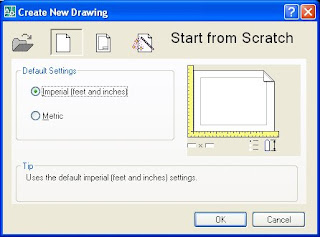 If yo use the QNEW command, you can assign a specific template file to be used every time. A real time saver. If you use the NEW command, then you get options. How are those options displayed for you? Do you get a dialog box allowing you to browse to a DWG file or a template file? Or do you get the Create a New Drawing wizard? I like the browser type functionality, others like the Wizard. Which is better? Neither. They both get the job done, just pick the one that suits your needs best.
The Wizard gives you these options: Open a Drawing, Start From Scratch, Open a Template, and Use a Wizard. the other lets open a file, you pick between DWG, DWF or DWS (DWS is a standards file in case you weren't familiar with the extension.) I don't want to start a file from scratch (typically) because I need my files to work with the rest of the company files that I work for. I need a template or an existing drawing. Others need to start from scratch often, so they leave this option available to them.
You can chose which method to use by changing a systems variable in AutoCAD. Don't worry, it is very easy to do, and there are only two choices. You can't mess it up. If you don't like it, switch it back. Ok here's how: at the command line type in STARTUP. There are two possible settings for this command, 0 (that's a zero not an "O") and 1. Set it to 0 to turn off the wizard. Set it to 1 to turn on the wizard. That's it. See, that didn't hurt.
I know I said that this is a QUICK TIP, but it really is, it just took me a while to get there. Perhaps next time I will write a fast tip. We'll see where that takes us.
Happy CADDING.
It is nice that I can do things my way, but it is annoying when I have to go and help somebody with an issue and they want to do things their way!! All kidding aside, lets look at one of these settings.
How do you start a new file? Many of use use the QNEW command. While others use it to, they just don't know about it. What? I'd know if I used that or not. Clicking on the NEW icon in the STANDARD toolbar (or in the quick access tool bar if you are using AutoCAD 2009), invokes the QNEW command.
 If yo use the QNEW command, you can assign a specific template file to be used every time. A real time saver. If you use the NEW command, then you get options. How are those options displayed for you? Do you get a dialog box allowing you to browse to a DWG file or a template file? Or do you get the Create a New Drawing wizard? I like the browser type functionality, others like the Wizard. Which is better? Neither. They both get the job done, just pick the one that suits your needs best.
The Wizard gives you these options: Open a Drawing, Start From Scratch, Open a Template, and Use a Wizard. the other lets open a file, you pick between DWG, DWF or DWS (DWS is a standards file in case you weren't familiar with the extension.) I don't want to start a file from scratch (typically) because I need my files to work with the rest of the company files that I work for. I need a template or an existing drawing. Others need to start from scratch often, so they leave this option available to them.
You can chose which method to use by changing a systems variable in AutoCAD. Don't worry, it is very easy to do, and there are only two choices. You can't mess it up. If you don't like it, switch it back. Ok here's how: at the command line type in STARTUP. There are two possible settings for this command, 0 (that's a zero not an "O") and 1. Set it to 0 to turn off the wizard. Set it to 1 to turn on the wizard. That's it. See, that didn't hurt.
I know I said that this is a QUICK TIP, but it really is, it just took me a while to get there. Perhaps next time I will write a fast tip. We'll see where that takes us.
Happy CADDING.
Monday, April 7, 2008
AutoCAD 2009 – Like it? Then PIN it
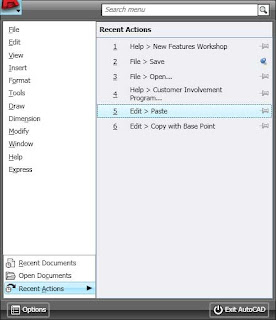 AutoCAD 2009 now has a PIN feature in almost every dialog box there is (keyword – almost). What do I mean by PIN you ask? Great question. In this instance, to PIN something, means to hold it in place in order to keep it visible. This is a process or feature that is popular in message boards on the Internet. Autodesk just brought it over into AutoCAD.
 Two questions: How do I PIN something and how do I know if it can be pinned? You guys (and gals) really ask great questions. My readers are the smartest readers on the net. I mean that. If something can be pinned, there will be an icon in that objects dialog box that looks like a pushpin. See image at the left:
In order to pin it, just click the PIN looking icon. To “UN”-pin it, click the icon again. Very simple.
If you want a file to stay listed in your menu-browser, just pin it. This is real nice when you are working on a particular file over and over again. Some dialog boxes will collapse, or partially collapse, but you can pin many of them opened. The Action Recorder is like this. Pin it open to see more of the recorded actions that were recorded.
You can pin the Quick View Drawings, or Quick View Layout images to stay opened if you want to.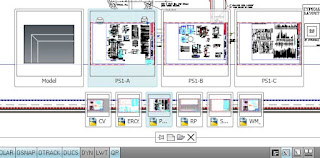
Look for the pin, if it see it and you want it, click it. If you get tired of it (whatever IT is) click the pushpin looking icon again to close the item. Very simple, just like I like it.
Subscribe to:
Comments (Atom)