Showing posts with label review. Show all posts

Thursday, March 27, 2014

Review HP Z1 All-in-One Workstation

I had a chance to take a look at Hewlett Packard’s all-in-one workstation the HP Z1.  Here is what I found.

Overview

The HP Z1 was a great machine to use.  I loved that it was compact but yet big enough. It was easy to transport and it performed as well as any other workstation.  With all of its components being literally in your face I expected the noise to be a bother. I found that it wasn’t. The HP Z1 runs very quietly and noise was not an issue. It had plenty of ports and functioned just like any other workstation. Not having to bend under my desk to insert media was a nice little benefit that I wanted to make sure I mentioned. Opening the body of the machine was quite easy to do and all components are easily accessed. The lack of wires was also very nice.

Main Specs


  • 27” Monitor
  • Intel Xeon Processor
  • 16 GB DDR3-1600 ECC RAM
  • Nvidia Quadro 4000M GPU
  • 1 TB SATA Hard Drive
  • Windows 7 Pro Operating System
  • HP SATA Blu-Ray Writer Slot Load Optical Drive
  • 400W Power Supply
  • ISV Certification
  • Tool-less Design Chassis
  • Dual Display Capable


Wednesday, October 2, 2013

Review-HP EliteBook 8570w Mobile Workstation


I tested the HP EliteBook 8570w Workstation.  Here is my review.  It is broken down into two parts; Brief Overview and Full Review.  The brief review is short and covers the major points.  The Full review goes into far greater detail.  Sometimes you just want to know the basics and sometimes you need to know everything.

Brief Overview

Main Specs

The EliteBook 8570w that I tested was on the high end of HP’s spectrum.  Here is a list of the main specifications for the hardware:
  • CPU:  Intel® Core™ i7-3740QM (2.7 GHz, 6 MB cache, 4 cores)
  • Display: 15” LCD (15.6”) active color with built-in webcam (1920x1080)
  • Memory:  16 GB 1600 MHz DDR3 SDRAM
  • Graphics: Nvidia Quadro K2000M 2GB 
  • Storage: Seagate 750 GB 7200 rpm SATA
  • Multimedia Drive: DVD read/write & SD Card slot
  • Security: Fingerprint reader, Face recognition
  • Operating System: Windows 7 Pro 
  • Wireless/Communications: Wi-Fi, 56K v.92 Modem, Optional HSPA+ Broadband Radio

The Good

The HP EliteBook 8570w mobile workstation is just that.  It has the full power of a desktop workstation, good graphics, interesting security options (fingerprint scanner), plenty of ports (USB, VGA, Display Port, Esata), the keyboard was easy to use, good looking screen, possible broadband data connection (built in), wi-fi, DVD player/recorder, and a backlit keyboard.  This mobile workstation has everything.  It is very expandable (up to 32 GB RAM on quad core i7), has a PCI slot, SD Card slot, and a great industrial design look.  It is very sturdy and rugged feeling.  A bonus is that the keyboard is full size and has a full numeric keypad.  Most laptops lack this feature.

Tuesday, October 23, 2012

Review-HP Designjet T2300 eMFP


Brief Overview


The HP Designjet T2300 eMFP is a large format, inkjet color printer, scanner, and copier with web connectivity that allows users to print to it remotely on either their computer or via a mobile device (such as a tablet or smartphone.)  It has two media rolls for continuous printing.  A color touch screen panel controls all the aspects of the device and a USB port next to the control panel where users can print directly from the USB drive.  HP sent me a review unit (and this thing is a huge beast of a printer by the way) to test.  Here I am sharing with you what I found.  What I liked and what I didn't care for.  In short, I really like this printer and I recommend it.

Thursday, September 6, 2012

Review-IMSI/Design TurboReview


IMSI/Design announced today the release of their latest mobile app, TurboReview.  IMSI also makes TurboViewer CAD file viewer app for iOS and Android as well as TurboCAD, a full-fledged 3D and 2D CAD modeling platform.  TurboReview is a mobile app available on iOS only.  An Android version is currently in development and will eventually be available.  IMSI did this with their other mobile apps, iOS first, then Android.

Friday, July 20, 2012

Hands On Review - HP z420 Workstation


Brief Overview

I had a chance to review one of HP’s Z series workstations, the HP z420 Workstation.  The z420 Workstation is a mid-range workstation.  It is a balance between price and performance and at the time of this writing is HP’s best-selling Workstation (per my interview with HP.)  Here is a brief review going over the basics and hitting on what I felt were the most important points.  If you want more detail and a look at my review process keep reading.

Main Specs
The HP z420 Workstation can come in a variety of hardware specifications.  We will discuss those later.  The unit I reviewed had the following major specs:

Friday, June 15, 2012

Hardware, Software reviews. I do them.


I am currently working on reviews for several different CAD related pieces of hardware (workstations, large format all in one printer/scanner, 3D mouse).  I also have lined up some CAD related software to look at too (raster to vector, browser based CAD, non-browser based CAD).

If you have any hardware, software, programs, tools, or services that relate in some way to the CAD industry, anything that a CAD User may use in their job, even briefly, related to design, engineering, architecture, manufacturing, GIS, CAM, AEC, PLM, surveying, managing any of these topics, anything!!  Contact me so we can discuss your product for a possible review on CAD-a-Blog.com

Go to the CONTACT page for details on contacting me.

Wednesday, May 16, 2012

Review Posts Coming


CAD-a-Blog is working on several hardware review posts right now that I know you will be interested in seeing.  I know how difficult it can be when looking at new hardware.  I've been there.  Am there.  We all need a resource that we can trust for fair, honest, and practical hardware information (and software.)  That’s why CAD-a-Blog is on a quest to bring you the best hardware (and software) reviews out there.

Saturday, March 10, 2012

3DConnexion’s SpacePilot™ Pro


3Dconnexion has been providing 3D mice for a long time now and I had the privilege of taking a look at their SpacePilot™ Pro.  A 3D mouse is an additional mouse that provides three dimensional interaction while working in CAD.  They allow easy access to different views through additional navigational tools.  Depending on the models features they can rotate your views, zoom in or out, pan, switch to saved views with the push of a button and provide a greater range of navigational tools than a standard mouse.  They do not replace a standard mouse but work with one.

3DConnexion’s SpacePilot™ Pro is their top of the line fully featured 3D mouse.  This product has all of the bells and whistles.  The SpacePilot™ Pro features six-degrees-of-freedom (6DoF) sensor technology, second generation Quickview Navigation Keys (providing 32 standard views), an LCD screen, multiple function keys, keyboard modifiers, and an ergonomic wrist rest design platform.

Wednesday, October 26, 2011

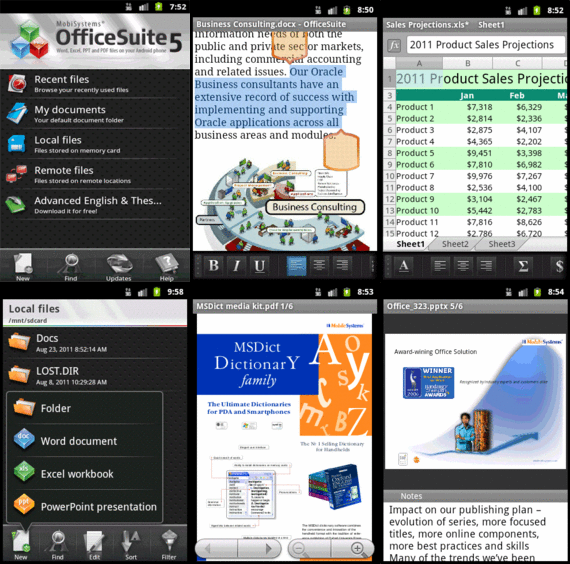
Mobi Systems Office Suite Pro 5 FREE on Amazon App Store - Today

The Amazon App Store has a free Android based App every day.  Today's app is Office Suite Pro 5 from Mobi Systems.  I already have an Office Suite for my Android hardware but I downloaded it anyway.  Why you ask?  Because (according to Mrs. CAD-a-Blog) I am an "App Hoarder"  She's not wrong.  I love me some apps, especially when they are free!  Amazon's Free App a day program is typically made up of stupid little games running anywhere from $0.99 and up.  Typically not a huge savings and typically apps I would never get, even when free.  But once every two to three weeks it seems Amazon throws in a golden nugget that keeps me coming back every day to see what's available.  I have gleaned some good stuff; CAM Scanner, Cut the Rope, Swift Key, Paper Camera, Printer Share Mobile (I can print from my phone/tablet), Thumb Keyboard, Wifi File Explorer and more.

The Amazon Android App Store is significant for two reasons: the free app a day program and the Kindle Fire (Coming November 15th.)  If you already have an Android device then getting free apps is a good thing.  If you plan on getting the Amazon Kindle then the only access you have to Android Apps will be through the Amazon App Store.  So if it's not there then your Kindle can't get it.  That's why I got this app today.  I didn't need it but there is a chance that I will be getting a Kindle Fire.  If so then I will want an office suite on it.  Now I don't have to buy one because the Amazon App Store knows which apps you purchased and you can reload them on all of your android devices, up to 5 I believe.  I just saved $15, if I get a Kindle Fire that is.  Yes I am an app hoarder.  If you don't like it then cast me in a reality show.

Office Suite Pro 5 is a pretty good mobile office suite.  It can open and edit Word, Excel, and Power Point files.  It can also open (not edit) PDF files.  But then most mobile office suites these days can.  It can handle these file types:
  • Text formats - Microsoft Office 97 to 2010 text documents - DOC and DOCX, RTF, TXT, LOG
  • Spreadsheets -Microsoft Office 97 to 2010 spreadsheets -XLS, XLSX andCSV
  • Presentations - Microsoft Office 97 to 2010 presentations -PPT, PPTX, PPSand PPSX
  • Other formats -PDF, EML, ZIP
Not bad, especially the ZIP format.  The App really shines when run on Honeycomb where it has a multi-pane view ability.  Another nice feature is the dictionary integration in the word processor.  Select a word and pick the Look Up option in the menu.  You have to have one of Mobi Systems Dictionary apps loaded to use this feature of course but maybe one day Amazon will give one of those away for free too!

One thing that I don't like about Office Suite Pro 5 is that it can only open/save files on the device or to your Google Docs account.  It can not integrate with other cloud based applications like MobileMe, Dropbox, Sugar Sync, Box, etc.  If you use Google Docs and the others then it's fine.  Or you can download your file from Dropbox to your device then open it through Office Suite Pro 5.  I use Dropbox a lot so for me it's an issue.  But I got the app for free!

Overall Mobi Systems Office Suite Pro 5 is a good mobile Office viewing/editing application.  It's worth the regular price of $15 in the Amazon App store but it's a steal for free.  Get it.  Right now. Before it's too late!

Sunday, July 3, 2011

AutoCAD 2012 & AutoCAD LT 2012 Bible - Review

New versions of AutoCAD mean new version of AutoCAD books.  Once again Wiley  Publishing, Inc.(http://www.wiley.com ) has released an updated version of Ellen Finkelstein's AutoCAD and AutoCAD LT Bible.  This version, AutoCAD 2012 & AutoCAD LT 2012 Bible, has been revised to reflect the additional features added to AutoCAD and AutoCAD LT 2012.  Once again Ellen Finkelstein (http://www.ellenfinkelstein.com) has given readers a comprehensive reference manual on AutoCAD and AutoCAD LT. 

The AutoCAD 2012 and AutoCAD LT 2012 Bible starts with a Quick Start chapter that gives the reader in introduction to AutoCAD and AutoCAD LT.  From there, the author provides an in-depth look at AutoCAD.  The book covers all of the basics needed to use AutoCAD.  It also contains enough advanced material to make an expert out of the reader.  The AutoCAD 2012 and AutoCAD LT 2012 Bible is a complete reference and tutorial.  Beginners can use this book to learn AutoCAD from scratch.  Intermediate users can become advanced users.  Advanced users can use this book as a reference tool to find and know all of the ins and outs of AutoCAD and AutoCAD LT. 

AutoCAD 2012 and AutoCAD LT 2012 Bible has 1296 pages.  It is to be release in July of 2011.  Wiley and Ellen Finkelstein have published versions of this book since AutoCAD release 14 and every release since.  This release will not disappoint.  It covers the basics of using AutoCAD, the advanced additions to its 3D modeling tools, and the book even covers programming in LISP for AutoCAD and in VBA.  The paperback book comes with a DVD that contains before and after drawings for each tutorial.  The sections of the books are marked so that the reader will immediate know when a feature is new to release 2012.  There are also icons that mark when a feature is only found in AutoCAD and not in AutoCAD LT.  There are other icons throughout the book that provide other guidance in the use of AutoCAD.  Tips and tricks that the author has discover and developed throughout her carrier are provided making the lessons thorough, practical and valuable.

AutoCAD 2012 and AutoCAD LT 2012 Bible is available in paperback from Wiley Publishing.  At the time this review was written it did not appear Wiley was providing a digital version for publishing.  The book is available for purchase through many online retailers such as Amazon and Barnes and Noble.  Barnes and Noble does provide an e-book version for their e-reader the Nook, though the electronic version was priced higher than the paper back version.  Amazon did not have a version for their e-reader, the Kindle.

I recommend purchasing the AutoCAD 2012 and AutoCAD LT 2012 for any AutoCAD or AutoCAD LT user, from anyone learning the program for the first time to the advanced CAD Manager.  The tutorials and examples make learning AutoCAD as simple as possible.  The cross references and appendices make it a fantastic reference book.  The content is thorough and complete.  Anything any user of any experience ever needs to know about AutoCAD can find it in this book.

I would rate this book as a must have purchase for any AutoCAD user!

Sunday, April 3, 2011

3Dconnexion releases drivers for 3D Mice for any application


3Dconnexion has just released a new driver for its line of 3D Mice. According to their press release and website, this new driver will let users use their 3D Mouse ( SpaceNavigator, SpaceNavigator for Notebooks, SpaceExplorer USB and SpacePilot PRO) with any application they are running! That's an interesting concept.

I downloaded the driver (108 mb) for Windows 64 bit and installed it on my Windows 7 laptop.  That was easy and painless.  I plugged my Navigator and later my Space Pilot PRO into my laptop and started opening programs.  The left button could not be altered, but I can change the function of the right.  Out of the box it acts like a left-click of the mouse (a regular mouse.)  The Space Pilot Pro already had so much integration with it (RSS feeds on the display, Outlook Integration, etc) that at first it didn't seem like much, but it's there.

In Chrome (and other browsers) I could scroll up and down web pages.  It gave the scroll wheel on my non-3D mouse a break.  In Adobe PDF Reader I could zoom in and out of my document and scroll through pages.  The same thing with Microsoft Word 2010.

So what does this mean?  For most people not much.  But for users it means that these 3D mice will (should) work out of the box with all applications.  No need to wait for the driver.  However, being able to use these 3D mice with "everything" is not that big of a deal.  It's not because it doesn't add much more functionality to the programs.  But if you already have one then use it.  If you were concerned about getting one (face it they aren't cheap) because you weren't sure if they would work with your program or maybe you wanted more bang for your buck, then now, maybe you don't have to worry about it.

There are drivers for Mac OS, 32 bit Windows, 63 bit Windows, Siemens (3DxMagellanProxy), and a few others.  I didn't see any Linux support.  These drivers are still in Beta and are not officially supported.  If you have any issues with them, well, use them at your own risk, they are beta.

Thursday, March 24, 2011

Product Review-the Pogo Plug

The Pogo Plug

The Pogo Plug is a very simple device that is easy to use and inexpensive to run.  It is a device and a service all in one that helps you create a personal cloud.  “Cloud” is a common buzz word these days in technology.  Put simply, “the cloud” is online storage.  Instead of keeping your files on your computer (desktop, laptop, netbook, tablet, mobile device) they are kept in “the cloud.”  This gives you access to your files on any device from anywhere.  The Pogo Plug from Cloud Engines (based in San Francisco, California, U.S.A.) provides this for you.  There are several models each of which provides the same basic cloud service.  Purchase the Pogo Plug model that suits your needs, set it up and start computing in the cloud.  No monthly fees, no service charges, nothing except for the one time purchase of the device.  This was one of the biggest selling points for me.  Yes I have a Pogo Plug and I love it.  It isn’t perfect of course, nothing is, but it does what I need it to and more.

Services

The Pogo Plug provides three main services:  remote access to files, file sharing, and live streaming.  There are a few more services but these are the three main reasons to get a Pogo Plug.

Once set up, the Pogo Plug gives you access to your files through an internet connection.  The Pogo Plug needs to be hooked in to your internet access from home (or small business, church, little league, etc.)  Once installed users can gain access either through an internet browser or through one of Pogo plug’s free downloadable applications.  There are two types of applications; for the desktop and for a mobile device.  You name the operating system and they have an application that applies.  It can be installed on Windows (XP, Vista, and 7 in either 32 or 63 bit), Linux and MAC OS.  They also have it available on mobile devices for iOS, Android, Blackberry, Windows Mobile and WebOS.  Like I said, you name it they make it.  The people at Pogo Plug want you to be able to access your files.

Sunday, February 8, 2009

Graphtec Wide Formet Scanner-Review

I have written a review article for Cadalyst Magazine. This review article take a look at Graphtec's CSX300-09HDplus Wide-Format Scanner. This scanner is meant for firms that need full color scanning but do not have a hehavy load. This reduces the initial cost so that the company will have access to color scanning. It does a great job of scanning, it's just slow. The black and white scanning abilities are up to par and allows companys to archive paper drawings.

Check out the full article at Cadalyst.

Wednesday, September 3, 2008

Google Chrome - review

Google has released their very own browser.  It is called CHROME.  With all of the browsers out there why would anyone want to release yet another one?  More importantly, why would anyone want to switch browsers?

I can give one reason-it's better.  Yup.  I have been using Chrome for about a day now and I have to say that it is much better in performance than Windows Internet Explorer.  What has long been the standard method for users to surf the internet is now the worst option that any one can take.  These are strong words I'm sure, but it is my honest opinion.  

Users are much better off using either Firefox, Safaria or Chrome.  I have been a loyal user of Firefox for a long time and I love it.  I have test run Safari for the past several months and I feel it too is a much better solution than Internet Explorer.  It's lacking in a few areas of adons, but give it some more time.

Now enter CHROME!!  That name sounds like one of the stars of the American Gladiator show!  After I downloaded the beta (yes, it's only in beta now) and installed it I ran it.  The screen asked if I wanted to import all of my Firefox or I.E. bookmarks, cookies, passwords, etc.  I said yes and it did!!  Great feature for switching over, and a must in my book.

There are two features that I particularly enjoy about Chrome.  It's simplicity and it's speed.

By simplicity I mean that the interface is neat and clean.  There are no extra frills making more room for screen real estate.  By speed I mean its lightning fast.  I didn't run any benchmark tests, but it is visibly faster.  Try loading this blog on your normal browser, then load it on Chrome.  See what I mean?  WOW!!  That's the very first thing I said when I tried it out.

One short coming when compared to Firefox is Chrome's lack of add ons.  But give it time, with Google's mode of operations, thhey will be here soon.

Anyway, I recomend trying Chrome.  

Thursday, July 17, 2008

Poll Results-Autodesk release Cycle

CAD-a-Blog conducted a readers poll (completely unscientific of course) to see how often you think Autodesk should release a new version of AutoCAD. This seems to be a hot topic at the moment due to many users unhappiness with AutoCAD 2009.

Here is what you said:

Out of 45 readers participating (I know, not that many) nobody wanted a 6 month cycle. I don't even think this is possible unless there is only one item to the update.

2% of the voters would like to see an 8 month cycle!! That's fast, and again, I'm not sure that's possible either.

4% wanted a 12 month (or yearly) cycle, which Autodesk has done since the 2003 release of AutoCAD 2004. It would seem that most people are unhappy or not fully satisfied with this type of a cycle.

13% would like to see an 18 month cycle which would be every year and a half, or two releases in a three year period. They would like to see Autodesk take a little bit more time to work on the program.

49% of the voters would like to see a 24 month, or bi-annual release of AutoCAD, that's almost half.

31% of users participating said a 36 month or three release cycle is the way to go. Is that too long of a wait?
-------------------------------------------------------------------------

Well, this pole is clearly not scientific, or far reaching enough for us to make any conclusions about the users. However, it does seem to coincide with other polls and discussions on the internet. It seems that keeping up with AutoCAD every year is becoming a hassle for many of its users, managers, and companies.

How long before this rapid release cycle takes a big enough toll on companies where they stop upgrading every year? there are many problems with a yearly release cycle on the users end, cost is the biggest, or course. Everything comes down to the bottom line. Autodesk has to serve not only their clients, but their stockholders. In fact, the big guns in charge at Autodesk answer first to the stockholders. The stockholders answer to their desire for valuable stock. In order to affect change in the stockholders perspective, the stock has to change value. The more profitable it is the more they will stay the same, and more of it. The less valuable it is, the more likely they are to change policy.

My point here is that everyone involved is in this thing to make money. Autodesk wants to make money selling the software to users. Users want to make money selling drawings, models, etc. by using the software. Perhaps the best question to ask is what do the user's clients need? That will dictate what the users will purchase and how they will work and for how much. Which will in turn direct Autodesk on what and how to produce in their software.

Sometimes the software provider, in its interest, has to create a need, hence the verticals of AutoCAD. Many users didn't know that they needed new and improved software to do their jobs until it was available. It's like color TV. Nobody knew the needed it until it was available. they were happy with black and white TV.

That's my two cents, please don't ask for change!!

Happy CADDING.

Thursday, July 10, 2008

Bye Bye Land Desktop - Hello Civil3D!!

How many of you work in a Civil (or AEC) related field? How many of you use Land Desktop? How many of you have moved to Civil3D? How many of you are trying to move to C3D but can't seem to get 'er done? Autodesk has officially announced the long expected demise of Land Desktop. What now?

Don't worry, your license of ALD (Autodesk Land Desktop) is still good and will work just fine. BUT (there's always a but), what if you come to a time when you have to update your software? You won't be able to. If you are on subscription with ALD, then maybe you need to review your contract. I'm not sure how Autodesk will handle that. Keep in mind that your subscription contract does indicate that there is no guarantee of a new release! If you just signed a three year subscription for Land Desktop, then, well, hmmmm.

What if you are in a situation where you don't use ALD but have set up an elaborate customization of routines, menus, tablets, blocks etc. to do your design and drafting work? This means that you need to start looking at Civil3D because your competition will be. Autodesk has reported several times that many Civil3D users see around a 33% (plus or minus of course) reduction in design drafting time. That means Civil3D companies can under bid you by 50%!! Can you compete with that? Where did I get 50%?

Lets say that it take $100 to do a job. If I use Civil3D, then I can do the job for 33% less. That means it will cost me $66 to do the job. $100 minus $66 is $34. $34 is about half (or 50%) of $66. If I do the job for $100 and my competition does it for $66, then I am making a bid on a job that is 50% higher than my competition !! I think that we would loose clients and eventually shut down. The other alternative is to reduce costs by 30%. How do you do that?

My point, even if you don't use Land Desktop, this will affect you.

Tuesday, June 3, 2008

Review-CADsmart-Good for Managers?

I want to talk to you again about CADsmart. I have posted about it a couple of times now (here and here) giving you some information about the software. We first spoke about what it does, generally speaking. Then we took a look at the assessments and how they work. Now I want to look at CADsmart from the manager’s aspect. What can we do with the information we just collected?

CADsmart really excels in the larger firms and for assessing interviewees. It doesn’t perform as well with small firms that have four or five CAD techs. If you are managing only five CAD users, then you already know where they struggle and where they excel. But if you have twenty, fifty, a hundred, or more, then you don’t have the time to know them as well. That’s where CADsmart can help. I also like it when assessing interviewees. It provides a fair environment for the tester, which gives you a more accurate assessment. Many firms have customized their CAD environment and that can intimidate and overwhelm a candidate if they are trying to get a job by taking a test in a place they are unfamiliar with. Sometimes upper management doesn’t understand these types of situations. CADsmart is a fairer assessment process.

Now that we have assessment data on our CAD users, how do we get to it and what do we do with it? Access is easy enough. Go to CADsmart’s website and log in. You will need an account to be able to do this. We will talk about getting an account later on. When you log on there are several options available to you. You can go directly to the performance charts, or go to the assessment results.

The performance charts provide a quick visual guide to the information collected. You can see your scores sorted by group (employee, interviewee, etc.) The charts provide you with a performance spread in one graph and a stage performance in a second graph. This gives you an overall look and a more detailed comparison. There are different color codes to help you differentiate between the groups and the benchmark. Hopefully the benchmark is the lowest set of scores you have! Everything here is online, but you can get the data and print it, transfer it to a PDF, or export it to a spreadsheet. There are many ways to see the data and to get it to use for yourself.

The assessment results tab is where you can go to get more detailed information about the individual test results. You can sort the data by any column and in any order. You can sort it and then resort it by clicking on the headers. You can add and sort your users results by groups. The default groups are Employees and Interviewees. In my test I added groups for our departments; engineering and surveying. This is a nice feature if you need to manage the results from different offices or departments.

The assessment results tab lists each user by name. If you click on the users surname it will open up a window that provides the basic testing data (time, date, CAD platform) and recommendations for training based on the assessment results. If you click on the result score, another window opens up providing a more detailed analysis of each stage. It provides the end score, the time taken, and an analysis. The analysis lets you know what the candidate did incorrectly! This is a great feature because it can better explain to you why they scored the way they did. How useful is an assessment that just says, “You scored an 85%.”? Not very. At the end of the assessment results it compares the score and time with the benchmark letting you know how your skills compare. When you are finished, you can click the print button to print out the certificate (that’s what they call the data sheet.) I was disappointed that CADsmart didn’t provide other output devices as in the Performance Chart Tab like the PDF and Spreadsheet options. That’s how you look at and use the assessment data. It’s very simple to use.

There are other tabs too that you would expect; account details (name, address, password, etc.), resources (this is where you download the assessment software and instruction guides), software settings (turn off testing options like the clock, intro movie, welcome message, and extra candidate labels), booking system (where you can schedule assessment times), support (where to go if you need help), and logout (that one’s obvious!)

You can see that with CADsmart, managers have many tools available to them to better assess the CAD skills of their users. There are many resources to go to for help (like the managers’ video) and more instruction. CADsmart also has some customization features that might help you out too. Overall I feel that CADsmart is a good program and a great service. It is easily used and implemented.

The biggest question is; how much does it cost? CADsmart has two methods, the Premier and the Classic. The premier provides unlimited use and with all the assessment data, recommendations, the whole thing. The Classic level of subscription only provides unlimited use of the Assessment Software and access to your data. This might be enough for some managers. It will depend on you, your needs and your budget.

The pricing varies from the classic to the premier and by the number of users. It seems to me that they are looking for a general usage amount. The website states that you can assess your users as many times as you want including as many interviewees as you have.

The price difference on 1 to 15 users from the classic to the premier was only about $300 (U.S.), ranging from about $1500 to about $1800 per annum. The price on 100 users ranged from about $6300 to about $7500 per annum. You will need to check for yourself as prices may change. They also provide pricing for other countries. The more users you add the higher the price.

Depending on the amount of employees you have, the price will obviously vary. If you have about 100 users, then the cost will be about the same as one license of your CAD software! I think that is a good price and well worth the money spent. I feel that CADsmart is a good investment in your company.

Tuesday, May 27, 2008

Review - CADsmart 2 of 3

A few days ago I gave you a brief overview of a software program I found called CADsmart. It is a program that you can download and run within AutoCAD (or Microstation) in order to assess your users’ general CAD skills. It doesn’t test programming skills, nor is it release specific, it only looks at general CAD drafting skills. Knowing what areas your users excel in along with the areas they don’t is very useful. It allows you to train them properly and where they need it.

Last time I gave an overview of what CADsmart can do, generally speaking. Now I want to get more specific.

Before you get started using it and before your users test with it, I recommend that everyone involved watches their online videos which let everyone know what to expect and how it works. This is a nice touch. It helps to relieve some of the stress that people have when they are being assessed, especially if they are taking it as part of a job interview or as a personnel review as an employee. People get nervous and they might not perform as well as they normally do when under pressure, so this feature helps.

Another feature that helps the scores be more accurate is that CADsmart runs within AutoCAD (or Microstation). It would be nice if you didn’t have to have AutoCAD to take the review, but this method does have a nice bonus to it. Since the user (if he/she is a current employee) is taking the assessment in a CAD setting that they are familiar with, they will perform better. They perform better because they are being tested in the same environment that they work in everyday. CADsmart also gives the user the ability to arrange the toolbars, pallets, icons, etc. to their liking before the exercise begins. This also helps interviewees test better in a new and different setting. Everyone involved gets better and more accurate scores.

Ten exercises are taken, each one covering different aspects. These ten topics are: Lines, Sheet Set Up/Xrefs, Circles & Arcs, Text, Blocks/Cells, Dimensions, Layers/Levels, Preferences, UCS/ACS. As you can see, these topics cover the general skills needed to be able to work with CAD software. It also breaks them up enough so that we can see what areas we do well in and in what areas need more training.

In order to take the assessment, the CADsmart software must be downloaded and installed on the testing machine. Once it is installed, log on and begin. If the candidate hasn’t watched the introduction movie yet, they will get the option during the set up phase. Some information about the user will have to be filled out in a form. This helps CADsmart identify who you are. They provide a guarantee that says they won’t give out that information to any third party; only CADsmart, you and your company will have access to that data. Once the form is filled out they can begin the assessment.

Each exercise will provide instructions and a preview of what is to be done. It is up to the candidate to figure out what to do and then do it. Be careful when reading the instructions, just as the video says, because if you don’t follow the instructions and do as you are told, your score will be lower than it could be! Once done, the candidate will receive an e-mail where they can go and find out their score. They will also receive an assessment comparing their score to the benchmark as well as recommendations on what areas to improve. This is one of the reasons they had to fill out all of that personal information, so that CADsmart would know who they are.

CADsmart is a simple to use program that provides valuable CAD skill assessment data and comparison. It is easy for users to test with and easy to set up. It is run in a CAD environment that is familiar to the candidate thus giving more accurate scores and skill assessments.

I’m going to stop again so that our minds won’t melt. In the near future I plan on taking a closer look as to what CADsmart offers the manager. We will look at the tools it provides in skill assessment, charts, data management, the benchmark, how to access the data, etc. We’ll also take a look at what managers can do with the information they just collected.

Happy CADDING

Tuesday, May 20, 2008

Review - CADsmart

CAD-a-Blog is about teaching CAD skills, especially AutoCAD skills. With that in mind, I try to keep my eyes open for products or services that can help users (and me too!) better themselves. I feel that I have found such a product.

Consider this scenario; imagine that you need to hire a new CAD user for your company. How do you know if that user can in fact use CAD? How do you know the extent of his or her skills?

Also consider this; how can you measure the CAD skills of your current users?

Well I have come across a product that comes from the United Kingdom. It is from CADsmart.
CADsmart is a company that provides testing software that measures general AutoCAD (and Microstation) skills in users. It has the ability to measure CAD drafting skills, not programming, not customizations, but CAD skills. In a nutshell, the user takes a series of drafting based assessments, each one covering a specific topic. The results are compared to a benchmark that has been developed by CADsmart from thousands of users that have taken the same or similar assessments. The user is scored individually and in comparison to other users. For example, one segments score could state that you scored an 80%. That means that you were 80% correct. Now compare that score to the benchmark and you will have a means to measure your abilities relative to the thousands of users that have already taken the assessment. This software gives you a score for the user and tells you if it is a good score or not.

CADsmart’s benchmark is meant to represent the average user. If you score above that, then you should be a good CAD user. If you score below the benchmark, then there might be some areas for training. The assessments are scored separately on overall accuracy and time taken. These two measurements can be compared to the benchmark or to other employees in your company.

CADsmart’s assessments cover specific topics. Each one consists of a series of steps that the user must complete. It doesn’t matter how the user gets the work done, or how long it takes, only that the end results are what they need to be. This is one of the main reasons that I like this software because every user will work in a slightly different way and what matters is the final drawing, not so much as how it was drawn. I said that time doesn’t matter, well it doesn’t affect the accuracy score, but it is measured and compared to the benchmark. So keep it in mind that you need to be both accurate and quick, just like in real life!

Each category has its own benchmark that you can compare your score with. This is very useful because it provides a means of determining where your specific problems are. This feature is great for managers too because it enables them to find specific problem areas in their users so that they can concentrate their training programs exactly where they are needed. Time and resources are not wasted training the wrong people in the wrong skill sets.

CADsmart is not perfect. It is not cost productive for a single user to buy the software and use it on themselves, though this can be done. It works best in a group environment. You also have to have AutoCAD software on your machine in order to run it. One other thing that I understand, but didn’t like too much, is that while taking the test, I can’t pause it in case my attention is needed elsewhere (That happened to me while I was taking the test. I got a low score in the dimension portion because of it-maybe I’m just bitter!) Playing devil’s advocate, if I could pause the assessment, then I could stop it, figure out the task, then start again. That’s cheating, so I understand the reason behind it, but I want it anyway!!

That’s the gist of it. I don’t want to overload you with information, so I am going to write about CADsmart in smaller bite size parts like this. Check out their website, read about them, and let me know what you think. Later I’m going to get more into the workings of it, what it has to offer managers in terms of assessment tools, charts, and recommendations. CADsmart will test the user, show the assessment data, and provide recommendations on what areas to train the specific users in. It is a very helpful tool in my opinion.

Happy CADDING!

Categories

AutoDesk (110) autocad (109) AutoCAD 2009 (40) augi (40) efficient (38) news (37) drafting (33) training (33) articles (30) CADaBlog (29) AutoCAD WS (23) Update (23) quick tip (22) video (21) mobile (19) review (19) cad (16) 3D Mouse (15) 3Dconnexion (15) Impression (15) Android (14) AutoCAD 2013 (14) cadalyst (14) me (14) AutoCAD 2010 (13) text (13) off topic (12) survey (12) Apps (11) hotfix (11) tips (11) 3D (10) AU (10) AutoCAD 2011 (10) service pack (10) workstation (10) Autodesk Labs (9) CAD Manager (9) annotation (9) blocks (9) cloud (9) fun (9) inventor (9) HP (8) Review-Product (8) autocad lt (8) videos (8) AutoCAD 2014 (7) Autodesk 360 (7) CUI (7) Windows 8 (7) iOS (7) new (7) IMSI Design (6) cad standards (6) files (6) google (6) infinite skills (6) printers (6) reference (6) ribbon (6) support (6) updates (6) workaround (6) RSS (5) TurboViewer (5) Upgrade (5) data (5) email (5) fields (5) guest post (5) keyboard (5) layers (5) paper space (5) pi (5) pi day (5) quotes (5) rant (5) selection (5) standards (5) styles (5) subscription (5) tech (5) 2D (4) AutoCAD Exchange (4) AutoCAD for Mac (4) Mac (4) Mastering AutoCAD (4) SketchBook (4) TurboCAD (4) UI (4) action recorder (4) dimension (4) driver (4) fills (4) large format printing (4) leaders (4) math (4) mobile workstation (4) salary (4) sheet sets (4) Amazon (3) Apple (3) AutoCAD 2012 (3) AutoCAD 2015 (3) AutoCAD 360 (3) AutoCAD Fundamentals (3) Civil 3D (3) DVD (3) DWF (3) Fusion (3) GIS (3) Kindle Fire (3) Lenovo (3) Microsoft (3) Review-Software (3) Wiley (3) Windows Phone 8 (3) Windows RT (3) annimation (3) announcements (3) autodesk plm (3) book (3) command alias (3) contest (3) filters (3) find (3) hardware (3) history (3) iPad (3) license (3) license software (3) lisp (3) menu browser (3) properties (3) purge (3) quick view (3) saas (3) tables (3) toolbars (3) weekend rant (3) what not to CAD (3) what not to do (3) #CADaBlogDVD2013 (2) 3D Modeling (2) 3ds Max (2) AutoCAD LT 2013 (2) AutoCAD LT for Mac (2) AutoCAD MAC (2) Autodesk. (2) BIM (2) CAD Services (2) CADSpeed (2) DWG (2) DXF (2) Designjet (2) Error (2) FAIL (2) Facecast (2) Freestyle (2) Fusion for Mac (2) George Omura (2) Mac OS (2) Mountain Lion (2) Novedge (2) Recomend (2) Review-Book (2) Revit LT (2) SpaceMouse Pro (2) Sybex (2) Tablet (2) Thinkstation (2) TurboReview (2) TurboViewer X (2) What Not To Do In AutoCAD (2) What's New (2) Windows (2) array (2) as-builts (2) beta (2) blog (2) circles (2) civil (2) civil design (2) collaboration (2) color (2) command line (2) commands (2) computer (2) copy (2) design (2) design review (2) dim style (2) download (2) eBook (2) eTransmit (2) file naming (2) free (2) geek stuff (2) grid (2) hotnews (2) interview (2) jobs (2) knowledge base (2) limits (2) look back (2) mouse (2) pallets (2) pgp (2) plotting (2) posts (2) press release (2) pricing (2) purchase (2) redlines (2) reference files (2) rental plans (2) shortcuts (2) sketchup (2) status bar (2) technology preview (2) tool pallet (2) tooltips (2) tv (2) units (2) video editing (2) viewer (2) webinar (2) 123D (1) 123D Catch (1) 123D Create (1) 123D Make (1) 2014 (1) 2015 (1) 3d Printing (1) ACAD/Medre.A (1) ADR (1) AEC (1) AUGI World (1) Account (1) Adobe (1) Apps Tab (1) AutoCAD 2016 (1) AutoCAD Error (1) AutoCAD LT 2012 (1) AutoCAD LT 2014 (1) AutoCAD LT 2015 (1) AutoCAD Mechanical (1) AutoCAD Revit Suite (1) Autodesk Account (1) Autodesk BIM 360 (1) Autodesk Instant (1) Autodesk PLM 360 (1) Autodesk ReCap (1) Award (1) CADDork (1) CADO (1) CTB (1) CadMouse (1) Camtasia (1) Communication Center (1) Corel (1) DWFx (1) Dassault Systemes (1) Death Star (1) Dell (1) Design Feed (1) Design Suites (1) DesignCAD (1) DoubleCAD (1) Duratec (1) E32 (1) ESET (1) ESRI (1) EliteBook (1) Epson (1) Evernote (1) Exchange Apps (1) FTP (1) ForceEffect (1) Free Form (1) Fusion 360 (1) GIS Day (1) GeoViewer (1) Geographic Information Systems (1) Geographic Location (1) Google Chromebook Pixel (1) Google Earth (1) Google Earth Pro (1) HP Designjet T2300 eMFP (1) HP EliteBook (1) HP EliteBook 8570w (1) HP Z1 (1) Help (1) Homestyler (1) IT (1) Infocenter (1) Inforbix (1) InfraWorks (1) InfraWorks 360 Pro (1) Infrastructure Modeler (1) Instant (1) Inventor 2013 (1) Inventor 2013 SP1 (1) Inventor LT (1) JPEG 2000 (1) Kickstarter (1) Kindle (1) Language packs (1) Lawsuit (1) Lenovo Thinkstation E32 (1) LizardTech (1) MS Exchange (1) Map 3D (1) Maya (1) MrSID (1) OS (1) OS X (1) Office Suite (1) Orange Juice Studios (1) P-Series (1) PLM (1) Photoshop (1) Pixel (1) Pixlr (1) Pixlr Express (1) Pixlr-o-matic (1) Plant (1) PogoPlug (1) Point Cloud (1) Previous (1) Project Artoo (1) Project Geppetto (1) Project Snap (1) R&D (1) Red Dot Award (1) Review-Service (1) Revit (1) Revit LT 2013 (1) Rhino (1) SDK (1) SMS (1) Secureload (1) Socialcam (1) Softimage (1) Solid Edge (1) SolidWorks (1) SpaceMouse Wireless (1) SpaceNavigator (1) Star Wars (1) SureColor (1) T-Series (1) TechSmith (1) The Future (1) Thinkstation E32 (1) Touch Screen (1) Trimble (1) TurboSite (1) TurboSite Reader (1) TurboViewer Pro (1) Unreconciled Layers (1) VBA (1) VOIP (1) Vault (1) Vault 2012 (1) Vela Systems (1) Visualization (1) WebOS (1) Welcome Screen (1) Windows Vista (1) Windows XP (1) Z1 (1) acad.doc (1) acad.lsp (1) acaddoc.lsp (1) acquisition (1) advice (1) aerial (1) all-in-one (1) angles (1) archive (1) arcs (1) author (1) autocad 2012. autocad lt 2012 (1) autocad. autocad for mac (1) autodesk logo (1) background (1) break (1) burrito (1) business (1) celebrate (1) check (1) checklist (1) chrome (1) chrome os (1) chromebook (1) climate (1) coming soon (1) communicate (1) constraints (1) construction (1) copier (1) crowd funding (1) customize (1) deadlines (1) design process (1) designer (1) desktop subscription (1) different language (1) draftsight (1) eMFP (1) ePrint (1) employee (1) employer (1) engineer (1) environment (1) event (1) feeds (1) file sharing (1) filepath (1) fix it (1) folders (1) font (1) government fail (1) groups (1) guide (1) hatching (1) imagery (1) initial setup (1) input (1) install (1) intel (1) internet (1) investment (1) isometrics (1) labels (1) layer manager (1) linetype (1) livestream (1) logo (1) macro (1) malware (1) message (1) mice (1) model space (1) modeling (1) multi leaders (1) navigation (1) newsletter (1) notifications (1) offset (1) opinion (1) options (1) overrides status bar (1) parametrics (1) patches (1) pay-as-you-go (1) perpetual license (1) podcast (1) poll (1) polyline (1) prank (1) printer failure (1) printers color (1) project draw (1) project files (1) project workflow (1) questions (1) recommend (1) release (1) remove (1) rent (1) repair (1) resume (1) reverse line direction (1) right click (1) save (1) scale (1) scanner (1) screen capture (1) sea turtles (1) send files (1) settings (1) snap (1) software (1) solutions (1) sony (1) student (1) subscription center (1) sustainability (1) system variables (1) tabs (1) tech snob (1) transparency (1) trial (1) undo (1) uninstall (1) viewports (1) virus (1) webcast (1) wiki (1) workplace (1)