Showing posts with label Apps. Show all posts

Thursday, March 13, 2014

Announcing Autodesk Instant – Group Messaging App from Autodesk


Autodesk launches group messaging app Autodesk Instant.  Right now it is only available in North America but they did manage to release it on Android and iOS.  It is a free app that provides a free service where groups of people can communicate through their mobile device.  I don’t have a lot of information on it right now but I am working on that.

Autodesk Instant will allow users to exchange messages, share photos, video and their location.  Users can communicate with anyone in their address book or a colleague that has verified their email with the app service.

The app is free and the service is free.  So far I have tried out the app with Curt Moreno, the Kung Fu Drafter, and it was easy enough to use.  He didn’t have Instant set up yet when I started the conversation so Instant went on its backup SMS delivery system.  Essentially it seems to be using my phone’s SMS options.  I was able to send him pictures just like you would any SMS or texting app.  I also sent him a map of my location.  Now he is stalking me!

Instant allows for one on one conversations or for group conversations.  I plan on investigating this new app and service from Autodesk further and will report back as soon as I have more information.

I have several questions for Autodesk about Instant and I am sure you do too.

Scott Sheppard, Autodesk Labs, discusses Autodesk Instant in his blog.

Links to download the app:
iOS
Android


Thursday, September 26, 2013

Autodesk Teams Up With Evernote


Autodesk is teaming up today with Evernote.  AutoCAD 360 Mobile is getting an update soon (iOS only, for now) that will provide users a way to insert Evernote Notes into AutoCAD 360’s Design Feed directly from the mobile app.  You will also be able to export an area of a drawing into an Evernote Note!  For AutoCAD and Evernote junkies this is huge news!  It streamlines a method of sharing relevant project data between users and provides a history of data exchange.

Autodesk recognizes that their customers are using multiple technologies throughout their workflow to stay organized, share information with co-workers and clients, store data, etc.  This is an effort on their part to make Autodesk (in this case AutoCAD 360 Mobile) products more compatible with other technologies.  Many users and companies use Evernote to organize their project information.  This new integration simplifies the process.

I was able to speak with Autodesk’s Amy Bunszel, Vice President, AutoCAD Products and Mayte Zavaleta, Product Line Manager, AutoCAD Products about this new collaboration.

Friday, January 11, 2013

LizardTech releases free GeoViewer app for Android.


LizardTech has had a free image viewer for desktops (GeoViewer) for some time now.  Now they have released a free version of their viewer on the Android platform through the Google Play Store.  GeoViewer is a simple viewer that can handle MrSID and JPEG 2000 images.  Users can pan and zoom to navigate the images.  You can also add vector layers like Esri Shape files and KML Files.

The app lets users measure distance between points, between a point and your current location (if your device’s GPS is enabled) or along a path of points.  GeoViewer can see geocoordinates of any location by touching that place on the screen.  Users can look at layer properties, the coordinate reference system being used, the layer’s geo bounding box, dimensions, colors pace, data type and resolution.  Users can also search locations by geographic coordinates in WGS84 (Lat/Long) or in the images native coordinate system.

Tuesday, October 30, 2012

Confirmed: Autodesk is making Windows 8 Apps


--UPDATED--2012-10-31
A few days ago I was wondering if Autodesk was going to make any Windows 8 apps.  I asked them, and they said, “it is our intention is to support many of our key products on Windows 8 in future versions.”

See previous post:
http://cadablog.blogspot.com/2012/10/is-autodesk-going-to-release-windows.html

It looks like they were true to their word.  Autodesk now has its first free Windows 8 App, Sketchbook Express.  And…it’s free!

This makes sense because I believe that Sketchbook Express was its first mobile app for iOS and then on Android.  If you are one of the people that picked up a Microsoft Surface with Windows RT last week, then you can get to work on Autodesk Sketchbook Express.

Thursday, October 25, 2012

Is Autodesk going to release a Windows 8/Windows RT/Windows Phone 8 version of AutoCAD WS?


Microsoft showed off Windows 8 and the Surface today.  Both look very interesting to me.  One question that has been on my mind is if Autodesk will release any of its mobile apps for Windows 8, both Windows 8 RT and Windows Phone 8?  Or neither?

I figured the best way to find out is to ask Autodesk.  So I did.  Here is the response from an Autodesk spokesperson:

“As of today (October 18th, 2012) no Autodesk products are supported on Windows 8, but it is our intention is to support many of our key products on Windows 8 in future versions. Our current offering of mobile apps are limited to iOS and Android but we are actively investigating opportunities to broaden offerings to include Windows 8 mobile versions.”

Thursday, September 6, 2012

Review-IMSI/Design TurboReview


IMSI/Design announced today the release of their latest mobile app, TurboReview.  IMSI also makes TurboViewer CAD file viewer app for iOS and Android as well as TurboCAD, a full-fledged 3D and 2D CAD modeling platform.  TurboReview is a mobile app available on iOS only.  An Android version is currently in development and will eventually be available.  IMSI did this with their other mobile apps, iOS first, then Android.

Tuesday, July 17, 2012

Autodesk to purchase Socialcam


Autodesk announced today that it has signed an agreement to purchase Socialcam for approximately $60 million (USD).
Socialcam is a mobile app that allows for video capture, editing and sharing.  The deal is set to close in Autodesk’s third quarter of fiscal 2013 which ends on October 31, 2012.
http://www.businesswire.com/news/home/20120717005592/en/Autodesk-Signs-Agreement-Acquire-Socialcam

Socialcam is a small business (only 4 employees) that spun off of Justin.tv the prior year.  It has been able to receive funding and is now being purchased by Autodesk.

http://techcrunch.com/2012/04/30/socialcam-angel-funding-investors/

Why would Autodesk want a mobile app that creates and edits videos? Why did they purchase Pixlr? For the same reasons they are making several mobile app versions of their own software and giving them all away for free.  This is the consumerification of Autodesk.  Autodesk has been producing high end software that, let’s face it, is very expensive.  The average person can’t afford to purchase AutoCAD, let alone one of their design suites.  Even if they could, why would they?  Consumers make up a very large audience that Autodesk wasn’t reaching.  Now Autodesk is making an effort to reach out to consumers.  They have saturated the professional design market, the SFx market, and now they want the consumer market.  Besides, Socialcam can always be marketed to professionals as well.  How useful would it be to go to the job site, record an inspection video, edit it there and send it back to the client, office, approving agency, etc.?  Very.

I’m interested in seeing how Autodesk uses this soon to be acquisition.

Monday, December 19, 2011

AutoCAD WS now available for the Kindle Fire

Image courtesy of autocadws.com
The AutoCAD WS blog announced today that AutoCAD WS is now available as an app for the Kindle Fire through the Amazon App Store.  It's the same as the "regular" AutoCAD WS Android app, but now you can get it through the Amazon App Store and it works on the Kindle Fire.  Good call Autodesk as the number of Kindle Fires in the wild will keep increasing.  Now, how about getting it on Barnes and Noble's Nook Color or Nook Tablet?  What?  Am I asking for too much?

Tuesday, December 6, 2011

Autodesk SketchBook Mobile for Android $0.10

The Android Market is celebrating the downloading of Ten Billion apps with their 10 Days of Offers - Top Premium Apps for $0.10 per day sale!!  Yes it's a mouthful.  The bottom line is that today Android users can get Autodesk's SketchBook Mobile for $0.10!!!  It is normally priced at $1.00 I believe.  At that price it won't break the bank but at one tenth the normal cost you may want to try it out if you haven't already.

Right now the other nine apps for ten cents are:
Check them out.  I also use Paper Camera and SwiftKey in case you were wondering.

Thursday, October 27, 2011

AutoCAD WS Mobile App now available on Amazon App Store - Ready for the Kindle Fire

AutoCAD WS, Autodesk’s mobile (and/or browser based) version of AutoCAD (or at least a CAD like program that can open and edit DWG files) is now available for download (for free) on Android devices from the Amazon App Store. AutoCAD WS has already been available through the Android Market for some time now as well as on iOS through the Apple App Store. So who cares? It’s the same thing just from a different place. Kindle Fire owners. I know, the Kindle Fire from Amazon will not be available until November 15th and the Amazon App Store is only available to customers in the United States. But the Kindle Fire has already pre-sold over a million units through preorders and will sell even more. The Kindle is an Android device that has been heavily customized by Amazon. Even though it is Android based it will not have access to the Android Market. It has apps but only through the Amazon App Store. That’s why this is a big deal. The Kindle Fire is going to double the amount of Android based tablets in the wild (that’s my prediction based on my own opinion). So if you have an Android App and you want Kindle Fire owners to use it, buy it, or recommend it to their friends then you really need to get your app on the Amazon App Store. It seems that Autodesk understands this.

Wednesday, October 26, 2011

Mobi Systems Office Suite Pro 5 FREE on Amazon App Store - Today

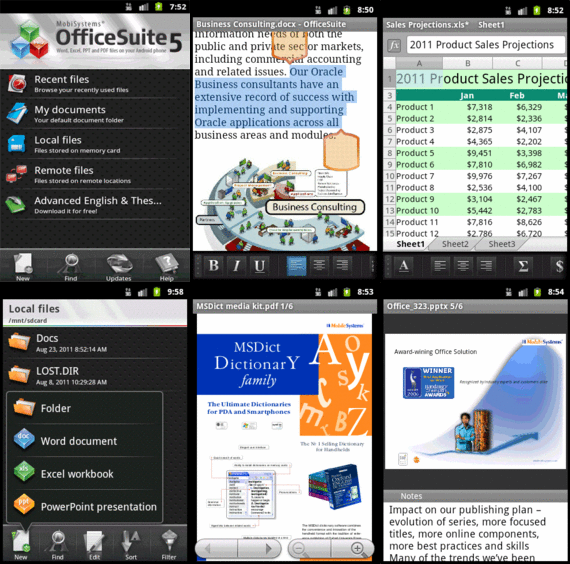
The Amazon App Store has a free Android based App every day.  Today's app is Office Suite Pro 5 from Mobi Systems.  I already have an Office Suite for my Android hardware but I downloaded it anyway.  Why you ask?  Because (according to Mrs. CAD-a-Blog) I am an "App Hoarder"  She's not wrong.  I love me some apps, especially when they are free!  Amazon's Free App a day program is typically made up of stupid little games running anywhere from $0.99 and up.  Typically not a huge savings and typically apps I would never get, even when free.  But once every two to three weeks it seems Amazon throws in a golden nugget that keeps me coming back every day to see what's available.  I have gleaned some good stuff; CAM Scanner, Cut the Rope, Swift Key, Paper Camera, Printer Share Mobile (I can print from my phone/tablet), Thumb Keyboard, Wifi File Explorer and more.
The Amazon Android App Store is significant for two reasons: the free app a day program and the Kindle Fire (Coming November 15th.)  If you already have an Android device then getting free apps is a good thing.  If you plan on getting the Amazon Kindle then the only access you have to Android Apps will be through the Amazon App Store.  So if it's not there then your Kindle can't get it.  That's why I got this app today.  I didn't need it but there is a chance that I will be getting a Kindle Fire.  If so then I will want an office suite on it.  Now I don't have to buy one because the Amazon App Store knows which apps you purchased and you can reload them on all of your android devices, up to 5 I believe.  I just saved $15, if I get a Kindle Fire that is.  Yes I am an app hoarder.  If you don't like it then cast me in a reality show.

Office Suite Pro 5 is a pretty good mobile office suite.  It can open and edit Word, Excel, and Power Point files.  It can also open (not edit) PDF files.  But then most mobile office suites these days can.  It can handle these file types:
  • Text formats - Microsoft Office 97 to 2010 text documents - DOC and DOCX, RTF, TXT, LOG
  • Spreadsheets -Microsoft Office 97 to 2010 spreadsheets -XLS, XLSX andCSV
  • Presentations - Microsoft Office 97 to 2010 presentations -PPT, PPTX, PPSand PPSX
  • Other formats -PDF, EML, ZIP
Not bad, especially the ZIP format.  The App really shines when run on Honeycomb where it has a multi-pane view ability.  Another nice feature is the dictionary integration in the word processor.  Select a word and pick the Look Up option in the menu.  You have to have one of Mobi Systems Dictionary apps loaded to use this feature of course but maybe one day Amazon will give one of those away for free too!
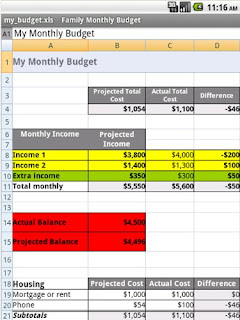
One thing that I don't like about Office Suite Pro 5 is that it can only open/save files on the device or to your Google Docs account.  It can not integrate with other cloud based applications like MobileMe, Dropbox, Sugar Sync, Box, etc.  If you use Google Docs and the others then it's fine.  Or you can download your file from Dropbox to your device then open it through Office Suite Pro 5.  I use Dropbox a lot so for me it's an issue.  But I got the app for free!

Overall Mobi Systems Office Suite Pro 5 is a good mobile Office viewing/editing application.  It's worth the regular price of $15 in the Amazon App store but it's a steal for free.  Get it.  Right now. Before it's too late!

Categories

AutoDesk (110) autocad (109) AutoCAD 2009 (40) augi (40) efficient (38) news (37) drafting (33) training (33) articles (30) CADaBlog (29) AutoCAD WS (23) Update (23) quick tip (22) video (21) mobile (19) review (19) cad (16) 3D Mouse (15) 3Dconnexion (15) Impression (15) Android (14) AutoCAD 2013 (14) cadalyst (14) me (14) AutoCAD 2010 (13) text (13) off topic (12) survey (12) Apps (11) hotfix (11) tips (11) 3D (10) AU (10) AutoCAD 2011 (10) service pack (10) workstation (10) Autodesk Labs (9) CAD Manager (9) annotation (9) blocks (9) cloud (9) fun (9) inventor (9) HP (8) Review-Product (8) autocad lt (8) videos (8) AutoCAD 2014 (7) Autodesk 360 (7) CUI (7) Windows 8 (7) iOS (7) new (7) IMSI Design (6) cad standards (6) files (6) google (6) infinite skills (6) printers (6) reference (6) ribbon (6) support (6) updates (6) workaround (6) RSS (5) TurboViewer (5) Upgrade (5) data (5) email (5) fields (5) guest post (5) keyboard (5) layers (5) paper space (5) pi (5) pi day (5) quotes (5) rant (5) selection (5) standards (5) styles (5) subscription (5) tech (5) 2D (4) AutoCAD Exchange (4) AutoCAD for Mac (4) Mac (4) Mastering AutoCAD (4) SketchBook (4) TurboCAD (4) UI (4) action recorder (4) dimension (4) driver (4) fills (4) large format printing (4) leaders (4) math (4) mobile workstation (4) salary (4) sheet sets (4) Amazon (3) Apple (3) AutoCAD 2012 (3) AutoCAD 2015 (3) AutoCAD 360 (3) AutoCAD Fundamentals (3) Civil 3D (3) DVD (3) DWF (3) Fusion (3) GIS (3) Kindle Fire (3) Lenovo (3) Microsoft (3) Review-Software (3) Wiley (3) Windows Phone 8 (3) Windows RT (3) annimation (3) announcements (3) autodesk plm (3) book (3) command alias (3) contest (3) filters (3) find (3) hardware (3) history (3) iPad (3) license (3) license software (3) lisp (3) menu browser (3) properties (3) purge (3) quick view (3) saas (3) tables (3) toolbars (3) weekend rant (3) what not to CAD (3) what not to do (3) #CADaBlogDVD2013 (2) 3D Modeling (2) 3ds Max (2) AutoCAD LT 2013 (2) AutoCAD LT for Mac (2) AutoCAD MAC (2) Autodesk. (2) BIM (2) CAD Services (2) CADSpeed (2) DWG (2) DXF (2) Designjet (2) Error (2) FAIL (2) Facecast (2) Freestyle (2) Fusion for Mac (2) George Omura (2) Mac OS (2) Mountain Lion (2) Novedge (2) Recomend (2) Review-Book (2) Revit LT (2) SpaceMouse Pro (2) Sybex (2) Tablet (2) Thinkstation (2) TurboReview (2) TurboViewer X (2) What Not To Do In AutoCAD (2) What's New (2) Windows (2) array (2) as-builts (2) beta (2) blog (2) circles (2) civil (2) civil design (2) collaboration (2) color (2) command line (2) commands (2) computer (2) copy (2) design (2) design review (2) dim style (2) download (2) eBook (2) eTransmit (2) file naming (2) free (2) geek stuff (2) grid (2) hotnews (2) interview (2) jobs (2) knowledge base (2) limits (2) look back (2) mouse (2) pallets (2) pgp (2) plotting (2) posts (2) press release (2) pricing (2) purchase (2) redlines (2) reference files (2) rental plans (2) shortcuts (2) sketchup (2) status bar (2) technology preview (2) tool pallet (2) tooltips (2) tv (2) units (2) video editing (2) viewer (2) webinar (2) 123D (1) 123D Catch (1) 123D Create (1) 123D Make (1) 2014 (1) 2015 (1) 3d Printing (1) ACAD/Medre.A (1) ADR (1) AEC (1) AUGI World (1) Account (1) Adobe (1) Apps Tab (1) AutoCAD 2016 (1) AutoCAD Error (1) AutoCAD LT 2012 (1) AutoCAD LT 2014 (1) AutoCAD LT 2015 (1) AutoCAD Mechanical (1) AutoCAD Revit Suite (1) Autodesk Account (1) Autodesk BIM 360 (1) Autodesk Instant (1) Autodesk PLM 360 (1) Autodesk ReCap (1) Award (1) CADDork (1) CADO (1) CTB (1) CadMouse (1) Camtasia (1) Communication Center (1) Corel (1) DWFx (1) Dassault Systemes (1) Death Star (1) Dell (1) Design Feed (1) Design Suites (1) DesignCAD (1) DoubleCAD (1) Duratec (1) E32 (1) ESET (1) ESRI (1) EliteBook (1) Epson (1) Evernote (1) Exchange Apps (1) FTP (1) ForceEffect (1) Free Form (1) Fusion 360 (1) GIS Day (1) GeoViewer (1) Geographic Information Systems (1) Geographic Location (1) Google Chromebook Pixel (1) Google Earth (1) Google Earth Pro (1) HP Designjet T2300 eMFP (1) HP EliteBook (1) HP EliteBook 8570w (1) HP Z1 (1) Help (1) Homestyler (1) IT (1) Infocenter (1) Inforbix (1) InfraWorks (1) InfraWorks 360 Pro (1) Infrastructure Modeler (1) Instant (1) Inventor 2013 (1) Inventor 2013 SP1 (1) Inventor LT (1) JPEG 2000 (1) Kickstarter (1) Kindle (1) Language packs (1) Lawsuit (1) Lenovo Thinkstation E32 (1) LizardTech (1) MS Exchange (1) Map 3D (1) Maya (1) MrSID (1) OS (1) OS X (1) Office Suite (1) Orange Juice Studios (1) P-Series (1) PLM (1) Photoshop (1) Pixel (1) Pixlr (1) Pixlr Express (1) Pixlr-o-matic (1) Plant (1) PogoPlug (1) Point Cloud (1) Previous (1) Project Artoo (1) Project Geppetto (1) Project Snap (1) R&D (1) Red Dot Award (1) Review-Service (1) Revit (1) Revit LT 2013 (1) Rhino (1) SDK (1) SMS (1) Secureload (1) Socialcam (1) Softimage (1) Solid Edge (1) SolidWorks (1) SpaceMouse Wireless (1) SpaceNavigator (1) Star Wars (1) SureColor (1) T-Series (1) TechSmith (1) The Future (1) Thinkstation E32 (1) Touch Screen (1) Trimble (1) TurboSite (1) TurboSite Reader (1) TurboViewer Pro (1) Unreconciled Layers (1) VBA (1) VOIP (1) Vault (1) Vault 2012 (1) Vela Systems (1) Visualization (1) WebOS (1) Welcome Screen (1) Windows Vista (1) Windows XP (1) Z1 (1) acad.doc (1) acad.lsp (1) acaddoc.lsp (1) acquisition (1) advice (1) aerial (1) all-in-one (1) angles (1) archive (1) arcs (1) author (1) autocad 2012. autocad lt 2012 (1) autocad. autocad for mac (1) autodesk logo (1) background (1) break (1) burrito (1) business (1) celebrate (1) check (1) checklist (1) chrome (1) chrome os (1) chromebook (1) climate (1) coming soon (1) communicate (1) constraints (1) construction (1) copier (1) crowd funding (1) customize (1) deadlines (1) design process (1) designer (1) desktop subscription (1) different language (1) draftsight (1) eMFP (1) ePrint (1) employee (1) employer (1) engineer (1) environment (1) event (1) feeds (1) file sharing (1) filepath (1) fix it (1) folders (1) font (1) government fail (1) groups (1) guide (1) hatching (1) imagery (1) initial setup (1) input (1) install (1) intel (1) internet (1) investment (1) isometrics (1) labels (1) layer manager (1) linetype (1) livestream (1) logo (1) macro (1) malware (1) message (1) mice (1) model space (1) modeling (1) multi leaders (1) navigation (1) newsletter (1) notifications (1) offset (1) opinion (1) options (1) overrides status bar (1) parametrics (1) patches (1) pay-as-you-go (1) perpetual license (1) podcast (1) poll (1) polyline (1) prank (1) printer failure (1) printers color (1) project draw (1) project files (1) project workflow (1) questions (1) recommend (1) release (1) remove (1) rent (1) repair (1) resume (1) reverse line direction (1) right click (1) save (1) scale (1) scanner (1) screen capture (1) sea turtles (1) send files (1) settings (1) snap (1) software (1) solutions (1) sony (1) student (1) subscription center (1) sustainability (1) system variables (1) tabs (1) tech snob (1) transparency (1) trial (1) undo (1) uninstall (1) viewports (1) virus (1) webcast (1) wiki (1) workplace (1)