Wednesday, October 26, 2011

Mobi Systems Office Suite Pro 5 FREE on Amazon App Store - Today

The Amazon App Store has a free Android based App every day.  Today's app is Office Suite Pro 5 from Mobi Systems.  I already have an Office Suite for my Android hardware but I downloaded it anyway.  Why you ask?  Because (according to Mrs. CAD-a-Blog) I am an "App Hoarder"  She's not wrong.  I love me some apps, especially when they are free!  Amazon's Free App a day program is typically made up of stupid little games running anywhere from $0.99 and up.  Typically not a huge savings and typically apps I would never get, even when free.  But once every two to three weeks it seems Amazon throws in a golden nugget that keeps me coming back every day to see what's available.  I have gleaned some good stuff; CAM Scanner, Cut the Rope, Swift Key, Paper Camera, Printer Share Mobile (I can print from my phone/tablet), Thumb Keyboard, Wifi File Explorer and more.

The Amazon Android App Store is significant for two reasons: the free app a day program and the Kindle Fire (Coming November 15th.)  If you already have an Android device then getting free apps is a good thing.  If you plan on getting the Amazon Kindle then the only access you have to Android Apps will be through the Amazon App Store.  So if it's not there then your Kindle can't get it.  That's why I got this app today.  I didn't need it but there is a chance that I will be getting a Kindle Fire.  If so then I will want an office suite on it.  Now I don't have to buy one because the Amazon App Store knows which apps you purchased and you can reload them on all of your android devices, up to 5 I believe.  I just saved $15, if I get a Kindle Fire that is.  Yes I am an app hoarder.  If you don't like it then cast me in a reality show.

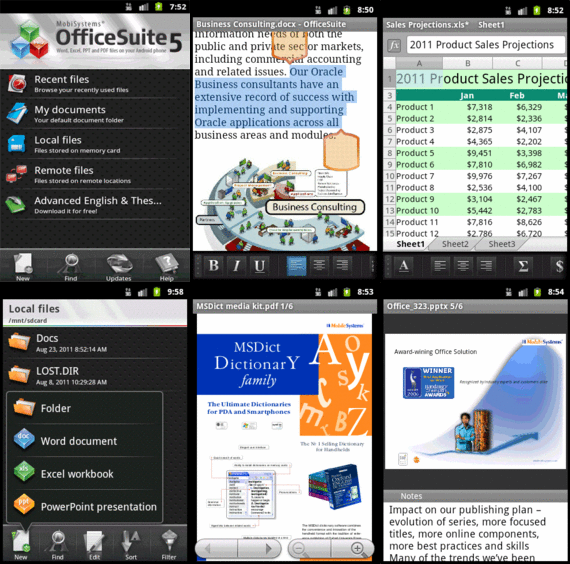
Office Suite Pro 5 is a pretty good mobile office suite.  It can open and edit Word, Excel, and Power Point files.  It can also open (not edit) PDF files.  But then most mobile office suites these days can.  It can handle these file types:
  • Text formats - Microsoft Office 97 to 2010 text documents - DOC and DOCX, RTF, TXT, LOG
  • Spreadsheets -Microsoft Office 97 to 2010 spreadsheets -XLS, XLSX andCSV
  • Presentations - Microsoft Office 97 to 2010 presentations -PPT, PPTX, PPSand PPSX
  • Other formats -PDF, EML, ZIP
Not bad, especially the ZIP format.  The App really shines when run on Honeycomb where it has a multi-pane view ability.  Another nice feature is the dictionary integration in the word processor.  Select a word and pick the Look Up option in the menu.  You have to have one of Mobi Systems Dictionary apps loaded to use this feature of course but maybe one day Amazon will give one of those away for free too!

One thing that I don't like about Office Suite Pro 5 is that it can only open/save files on the device or to your Google Docs account.  It can not integrate with other cloud based applications like MobileMe, Dropbox, Sugar Sync, Box, etc.  If you use Google Docs and the others then it's fine.  Or you can download your file from Dropbox to your device then open it through Office Suite Pro 5.  I use Dropbox a lot so for me it's an issue.  But I got the app for free!

Overall Mobi Systems Office Suite Pro 5 is a good mobile Office viewing/editing application.  It's worth the regular price of $15 in the Amazon App store but it's a steal for free.  Get it.  Right now. Before it's too late!
There was an error in this gadget

Categories

AutoDesk (96) autocad (88) AutoCAD 2009 (40) augi (40) efficient (37) articles (30) CADaBlog (29) drafting (29) training (29) news (28) AutoCAD WS (23) Update (20) quick tip (20) video (19) review (17) mobile (16) Impression (15) AutoCAD 2013 (14) cadalyst (14) me (14) 3D Mouse (13) Android (13) AutoCAD 2010 (13) cad (13) off topic (12) survey (12) text (12) 3Dconnexion (11) AU (10) AutoCAD 2011 (10) Apps (9) Autodesk Labs (9) annotation (9) blocks (9) fun (9) service pack (9) 3D (8) hotfix (8) inventor (8) CUI (7) Windows 8 (7) cloud (7) Autodesk 360 (6) CAD Manager (6) HP (6) IMSI Design (6) Review-Product (6) files (6) infinite skills (6) reference (6) ribbon (6) videos (6) workaround (6) workstation (6) RSS (5) TurboViewer (5) autocad lt (5) data (5) email (5) fields (5) google (5) paper space (5) printers (5) quotes (5) rant (5) support (5) tech (5) tips (5) AutoCAD 2014 (4) AutoCAD Exchange (4) Mastering AutoCAD (4) SketchBook (4) TurboCAD (4) UI (4) action recorder (4) cad standards (4) dimension (4) driver (4) fills (4) guest post (4) iOS (4) layers (4) leaders (4) salary (4) selection (4) styles (4) Amazon (3) Apple (3) AutoCAD 2012 (3) AutoCAD Fundamentals (3) AutoCAD for Mac (3) DVD (3) DWF (3) Kindle Fire (3) Mac (3) Microsoft (3) Upgrade (3) Wiley (3) Windows Phone 8 (3) Windows RT (3) annimation (3) announcements (3) autodesk plm (3) contest (3) find (3) history (3) keyboard (3) large format printing (3) lisp (3) math (3) menu browser (3) mobile workstation (3) pi (3) pi day (3) properties (3) purge (3) quick view (3) saas (3) sheet sets (3) standards (3) tables (3) toolbars (3) weekend rant (3) #CADaBlogDVD2013 (2) 3ds Max (2) AutoCAD LT 2013 (2) AutoCAD LT for Mac (2) AutoCAD MAC (2) BIM (2) CADSpeed (2) Civil 3D (2) DWG (2) DXF (2) Designjet (2) Facecast (2) Freestyle (2) Fusion (2) Fusion for Mac (2) GIS (2) George Omura (2) Mac OS (2) Mountain Lion (2) Novedge (2) Recomend (2) Review-Book (2) Review-Software (2) Sybex (2) Tablet (2) TurboReview (2) TurboViewer X (2) Windows (2) array (2) as-builts (2) beta (2) blog (2) book (2) circles (2) color (2) commands (2) copy (2) design (2) file naming (2) filters (2) geek stuff (2) grid (2) hotnews (2) iPad (2) knowledge base (2) limits (2) look back (2) new (2) pallets (2) plotting (2) posts (2) press release (2) purchase (2) sketchup (2) status bar (2) subscription (2) technology preview (2) tool pallet (2) tooltips (2) tv (2) units (2) video editing (2) viewer (2) webinar (2) what not to CAD (2) 123D (1) 123D Catch (1) 123D Create (1) 123D Make (1) 2014 (1) 2D (1) 3d Printing (1) ACAD/Medre.A (1) ADR (1) AEC (1) AUGI World (1) Apps Tab (1) AutoCAD 360 (1) AutoCAD Error (1) AutoCAD LT 2012 (1) AutoCAD Mechanical (1) AutoCAD Revit Suite (1) Autodesk BIM 360 (1) Autodesk PLM 360 (1) Autodesk ReCap (1) Award (1) CAD Services (1) CTB (1) Camtasia (1) Communication Center (1) DWFx (1) Dassault Systemes (1) Death Star (1) Dell (1) Design Feed (1) Design Suites (1) DesignCAD (1) DoubleCAD (1) Duratec (1) ESET (1) ESRI (1) EliteBook (1) Epson (1) Error (1) Exchange Apps (1) FAIL (1) ForceEffect (1) GIS Day (1) GeoViewer (1) Geographic Information Systems (1) Geographic Location (1) Google Chromebook Pixel (1) HP Designjet T2300 eMFP (1) Help (1) Homestyler (1) IT (1) Infocenter (1) Inforbix (1) Infrastructure Modeler (1) Inventor 2013 (1) Inventor 2013 SP1 (1) JPEG 2000 (1) Kickstarter (1) Kindle (1) Lenovo (1) LizardTech (1) MS Exchange (1) Map 3D (1) Maya (1) MrSID (1) OS (1) OS X (1) Office Suite (1) PLM (1) Photoshop (1) Pixel (1) Pixlr (1) Pixlr Express (1) Pixlr-o-matic (1) Plant (1) PogoPlug (1) Point Cloud (1) Project Artoo (1) Project Geppetto (1) Project Snap (1) Red Dot Award (1) Review-Service (1) Revit (1) Revit LT (1) Revit LT 2013 (1) Rhino (1) SDK (1) Secureload (1) Socialcam (1) Softimage (1) Solid Edge (1) SolidWorks (1) SpaceMouse Pro (1) Star Wars (1) SureColor (1) T-Series (1) TechSmith (1) Touch Screen (1) Trimble (1) TurboSite (1) TurboSite Reader (1) TurboViewer Pro (1) VBA (1) VOIP (1) Vault (1) Vault 2012 (1) Vela Systems (1) WebOS (1) Welcome Screen (1) Windows Vista (1) Windows XP (1) acad.doc (1) acad.lsp (1) acaddoc.lsp (1) acquisition (1) aerial (1) angles (1) archive (1) arcs (1) author (1) autocad 2012. autocad lt 2012 (1) autocad. autocad for mac (1) autodesk logo (1) background (1) burrito (1) celebrate (1) chrome (1) chrome os (1) chromebook (1) civil (1) civil design (1) climate (1) collaboration (1) command alias (1) command line (1) constraints (1) construction (1) copier (1) crowd funding (1) customize (1) design process (1) design review (1) designer (1) dim style (1) download (1) draftsight (1) eBook (1) eMFP (1) ePrint (1) eTransmit (1) engineer (1) environment (1) event (1) feeds (1) filepath (1) folders (1) government fail (1) groups (1) hardware (1) hatching (1) initial setup (1) input (1) intel (1) internet (1) interview (1) isometrics (1) jobs (1) linetype (1) livestream (1) logo (1) macro (1) malware (1) model space (1) multi leaders (1) navigation (1) newsletter (1) notifications (1) offset (1) opinion (1) options (1) overrides status bar (1) parametrics (1) pgp (1) podcast (1) poll (1) polyline (1) prank (1) printers color (1) project draw (1) project workflow (1) recommend (1) reference files (1) resume (1) reverse line direction (1) right click (1) save (1) scanner (1) screen capture (1) sea turtles (1) settings (1) snap (1) software (1) sony (1) student (1) sustainability (1) system variables (1) tabs (1) tech snob (1) transparency (1) trial (1) undo (1) updates (1) viewports (1) virus (1) webcast (1) what not to do (1) wiki (1) workplace (1)

CAD Videos

Loading...